DATAKIT SDK  V2026.4
JT Write Samples


Full samples source code

Introduction

Before writing Jt files, you need to initialise Datakit API.
Checking the main, we need to :

  • start Datakit API with Dtk_API::StartAPI function, and precise the working directory as its mandatory first parameter
  • intialise tessellation, we will need it to store Dtk_BodyPtr
  • We remove wire creation while tessellating.
  • stop Datakit API at the end with Dtk_API::StopAPI

    //start_of_jtwmain
    DtkErrorStatus JtWriteSample(const Dtk_string &inResultDirectory)
    {
    std::cout << std::endl << "----------------------------------------------" << std::endl;
    std::cout << "Jt Write start" << std::endl;
    tess_InitTesselation("./", 0.005); // Init Tessellation : working directory and default tolerance (needed for writing bodies)
    tess_ComputeBoundariesFromMesh(0); // Disable wire creation on mesh during Brep tessellation.
    DtkErrorStatus errorStatus = AllJtWTests(inResultDirectory); // all tests.
    tess_EndTesselation(); // End of tessellation
    std::cout << "Jt Write end" << std::endl;
    return errorStatus;
    }
    //end_of_jtwmain

    The list of available tests of this sample are in function AllJtWTests


Meshes


One Mesh (1.1)

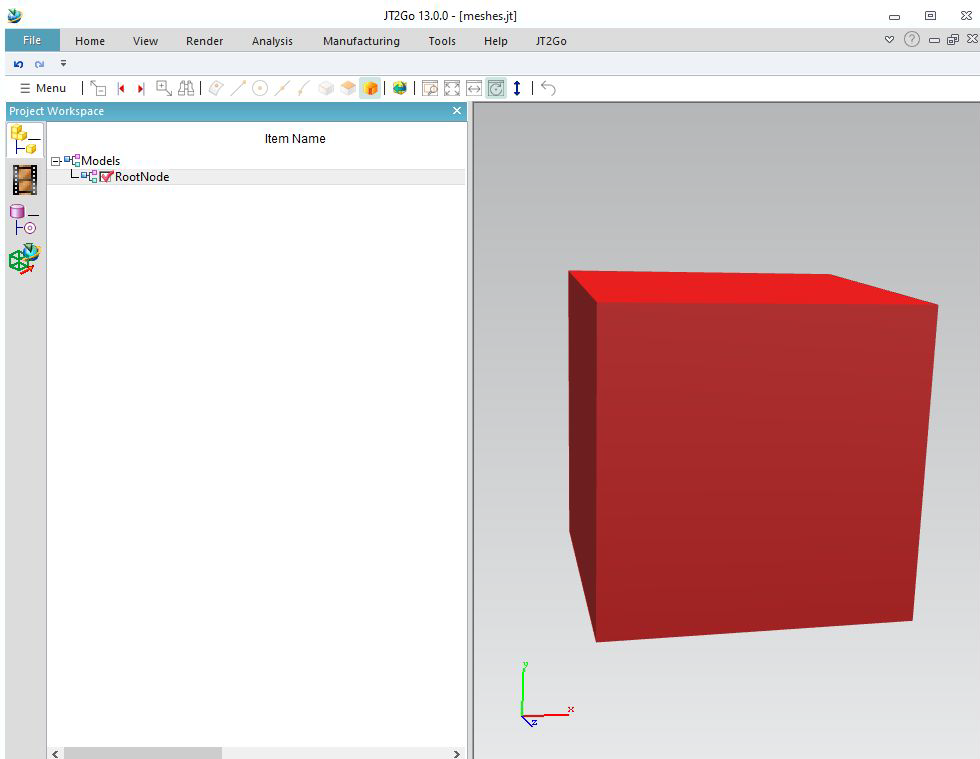
Let start with a simple code that will write a JT file containing a red cube (as mesh).
//start_of_jtwsample11
// ------------------------------------ SampleOneMesh_1_1 ---------------------------------------------
{
Dtk_ErrorStatus errorStatus;
Dtk_Jtw_Interface jtWriter(inOutputFileName, errorStatus);
CHECK_OK(errorStatus);
CHECK_OK(jtWriter.OpenInstance("RootNode")); // Rootnode creation
Dtk_MeshPtr CubeMesh = sampleWriter::CreateMeshCube(); // create a simple red cube
CHECK_OK(jtWriter.AddMesh(CubeMesh)); // write the cube
CHECK_OK(jtWriter.CloseLastInstance()); // Rootnode closing.
std::cout << "=> " << inOutputFileName.c_str() << std::endl;
return dtkNoError; // Automatic Finish while J released
}
//end_of_jtwsample11
  • First, we init the writer with output file name
  • Then we create the root node, giving it the name « RootNode ».
  • We create a red cube, see comon function sampleWriter::CreateMeshCube()
  • Then we add it into the writer,
  • close the root node,
  • Automatic Finish when J released

Transparency, per vertex color, wireframe (1.2)

We will see with this example how to write transparency, wireframe, and points

//start_of_jtwsample12
template <typename T>
inline void Shift(T& inoutMesh, double inShiftAmount)
{
Dtk_transfo translation;
translation.addTranslate(Dtk_dir(inShiftAmount, 0, 0));
inoutMesh->Transform(translation);
}
{
Dtk_ErrorStatus errorStatus;
Dtk_Jtw_Interface jtWriter(inOutputFileName, errorStatus);
CHECK_OK(errorStatus);
CHECK_OK(jtWriter.OpenInstance("RootNode")); // Rootnode creation
Dtk_MeshPtr CubeMesh = sampleWriter::CreateMeshCube(); // create a simple red cube
CHECK_OK(jtWriter.AddMesh(CubeMesh)); // write the cube (A)
Dtk_MeshPtr CubePervertexColorMesh = sampleWriter::CreateMeshCubeVertexColor(); // create a per vertex color cube
Shift(CubePervertexColorMesh, 3); // translate it not to be on previous geometry
CHECK_OK(jtWriter.AddMesh(CubePervertexColorMesh)); // (B)
Dtk_MeshPtr TransparentCube = sampleWriter::CreateMeshCube(); // create a simple red cube
TransparentCube->info()->SetColor(Dtk_RGB(0, 255, 0, 128)); // set whole cube as green and transparent
Shift(TransparentCube, 6); // translate it not to be on previous geometry
CHECK_OK(jtWriter.AddMesh(TransparentCube)); // (C)
Dtk_MeshPtr TransparentOneFaceCube = sampleWriter::CreateMeshCube(); // create a simple red cube
if (TransparentOneFaceCube->get_nb_mesh_face() == 6)
{
if (TransparentOneFaceCube->get_mesh_face(3)->info().IsNULL())
TransparentOneFaceCube->get_mesh_face(3)->info() = Dtk_Info::Create();
TransparentOneFaceCube->get_mesh_face(3)->info()->SetColor(Dtk_RGB(0, 0, 255, 128)); // set face 3 as blue and transparent
}
Shift(TransparentOneFaceCube, 9); // translate it not to be on previous geometry (D)
CHECK_OK(jtWriter.AddMesh(TransparentOneFaceCube));
Dtk_MeshPtr MeshWire = sampleWriter::CreateMeshWire(); // create wire mesh
Shift(MeshWire, 12); // translate it not to be on previous geometry
CHECK_OK(jtWriter.AddMesh(MeshWire)); // (E)
Dtk_MeshPtr MeshPoints = sampleWriter::CreateMeshPoints(); // create a mesh wich contain only orange points.
Shift(MeshPoints, 15); // translate it not to be on previous geometry
CHECK_OK(jtWriter.AddMesh(MeshPoints)); // (F)
CHECK_OK(jtWriter.CloseLastInstance()); // Rootnode closing.
std::cout << "=> " << inOutputFileName.c_str() << std::endl;
return dtkNoError; // Automatic Finish while J released
}
//end_of_jtwsample12

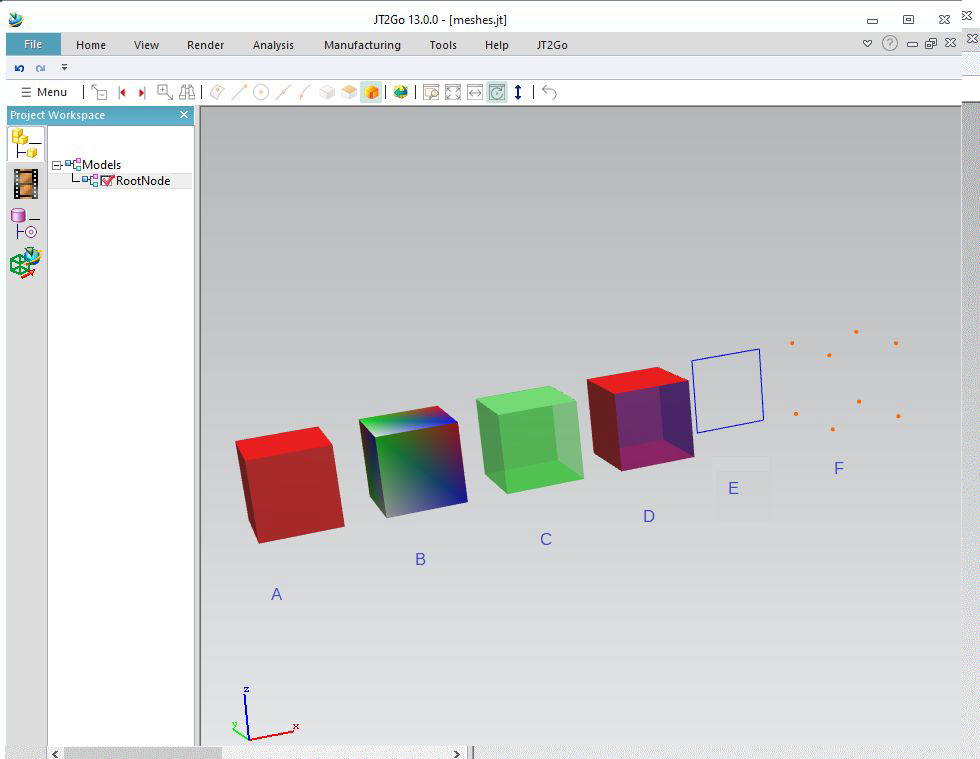
This sample will make 6 cases :

  • Case A, the previous opaque red cube
  • Case B, and percolor vertex cube. We apply a transformation on the cube to shift it, in order not to overlap previous cube. See "Shift" subfunction to see how to shift a mesh.
  • Case C, a transparent green cube : the last parameter of Dtk_Rgb defines a transparency, between 0 and 255. Here, 128 is an half transparent cube.
  • Case D, this time we make a blue transparent face on a single face of the cube.
  • Case E, Dtk_mesh can also store a wire geometry, and we can write it.
  • Case F, Dtk_mesh can also store points, and we can write it.

Textures on meshes (1.3)

We will see in this sample how to set textures on meshes.

//start_of_jtwsample13
inline void AddVertex( Dtk_MeshPtr inoutMesh, const Dtk_pnt& inPosition, const Dtk_dir& inNormal, float inTexU, float inTexV )
{
inoutMesh->add_vertex( &inPosition, &inNormal, NULL, inTexU, inTexV );
}
{
Dtk_mesh_face* mf = new Dtk_mesh_face( mesh.operator->() );
mesh->add_mesh_face( mf );
AddVertex( mesh, Dtk_pnt( 0, 0, 0 ), Dtk_dir( 0, 0, 1 ), 0, 0 );
AddVertex( mesh, Dtk_pnt( 10, 0, 0 ), Dtk_dir( 0, 0, 1 ), 1, 0 );
AddVertex( mesh, Dtk_pnt( 10, 10, 0 ), Dtk_dir( 0, 0, 1 ), 1, 1 );
AddVertex( mesh, Dtk_pnt( 0, 10, 0 ), Dtk_dir( 0, 0, 1 ), 0, 1 );
inds.push_back( 0 ); inds.push_back( 1 ); inds.push_back( 2 );
inds.push_back( 0 ); inds.push_back( 2 ); inds.push_back( 3 );
mf->add_triangles(&inds );
// texture
Dtk_picture picture;
picture.MetricHeight() = picture.MetricWidth() = 256;
picture.PixelWidth() = 256;
picture.PixelHeight() = 256;
picture.File().resize( 256 * 256 * 3 );
size_t i, size = picture.File().size();
for( i = 0; i < size; i++ ) // make "random" pixels
picture.File()[ i ] = ( i * i + i / 256 ) % 256;
texture->SetTextureImage( &picture );
Dtk_RenderInfosPtr render = Dtk_RenderInfos::Create( "uselessname", NULL, texture );
mf->info()->AddRenderInfos( render );
return mesh;
}
{
Dtk_ErrorStatus errorStatus;
Dtk_Jtw_Interface jtWriter( inOutputFileName, errorStatus );
CHECK_OK( errorStatus );
CHECK_OK( jtWriter.OpenInstance( "RootNode" ) ); // Rootnode creation
Dtk_MeshPtr TextureMesh = CreateTextureMesh(); // create a simple red cube
CHECK_OK( jtWriter.AddMesh( TextureMesh ) ); // write the cube
CHECK_OK( jtWriter.CloseLastInstance() ); // Rootnode closing.
std::cout << "=> " << inOutputFileName.c_str() << std::endl;
return dtkNoError; // Automatic Finish while J released
}
//end_of_jtwsample13

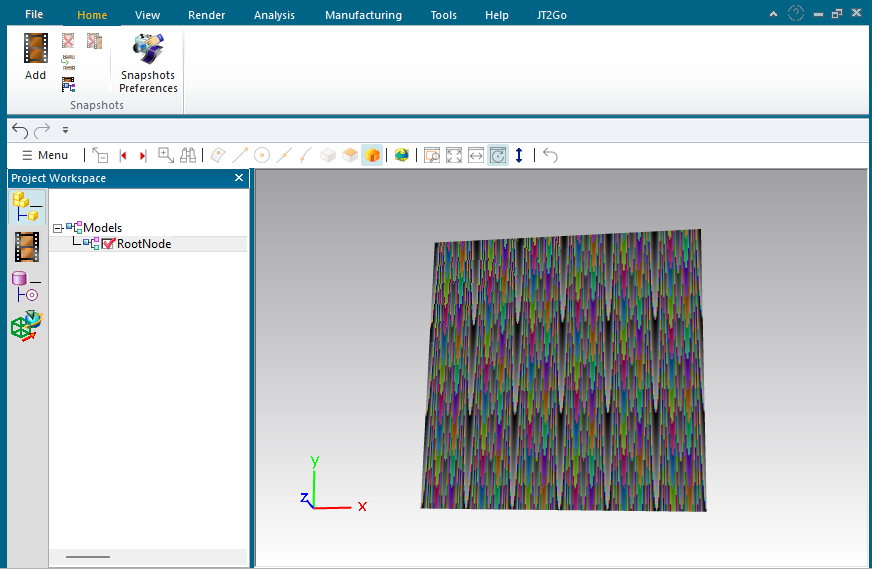
In this sample, we create a simple mesh, with only one quad, and with u,v textures coordinates. Setting a texture is made by setting a picture inside a Dtk_RenderInfosPtr. We link this renderinfo inside the info field of the mesh.

A Dtk_Picture can hold binary datas of each file formats (JPG, PNG....) or directly RGB pixels. In this case, we just create a RGB map, then we randomly set pixels inside. One the mesh embbed the texture, Datakit JT Writer apply it inside JTfiles.

Bodies


Writing body (2.1)

Jt also support writing bodies as Parasolid bodies.
You will need to link Datakit Parasolid Write library.
Because Jt always stores meshes internally, you will need Datakit Tessellation library too.
Back to main, we see tessellation initialisation. From this sample, it will be required.

//start_of_jtwsample21
{
Dtk_ErrorStatus errorStatus;
Dtk_Jtw_Interface jtWriter(inOutputFileName, errorStatus, Dtk_Jtw_Interface::xtbrep); // Specify allowing BREP Writing
CHECK_OK(errorStatus);
CHECK_OK(jtWriter.OpenInstance("RootNode")); // Rootnode creation
Dtk_BodyPtr cylinder = sampleWriter::CreateCyl(1, 2); // Create a Cylinder radius=1, height=2 (with a green face)
CHECK_OK(jtWriter.AddBody(cylinder)); // Add the body
CHECK_OK(jtWriter.CloseLastInstance()); // Rootnode closing.
std::cout << "=> " << inOutputFileName.c_str() << std::endl;
return dtkNoError;// Automatic Finish while J released
}
//end_of_jtwsample21

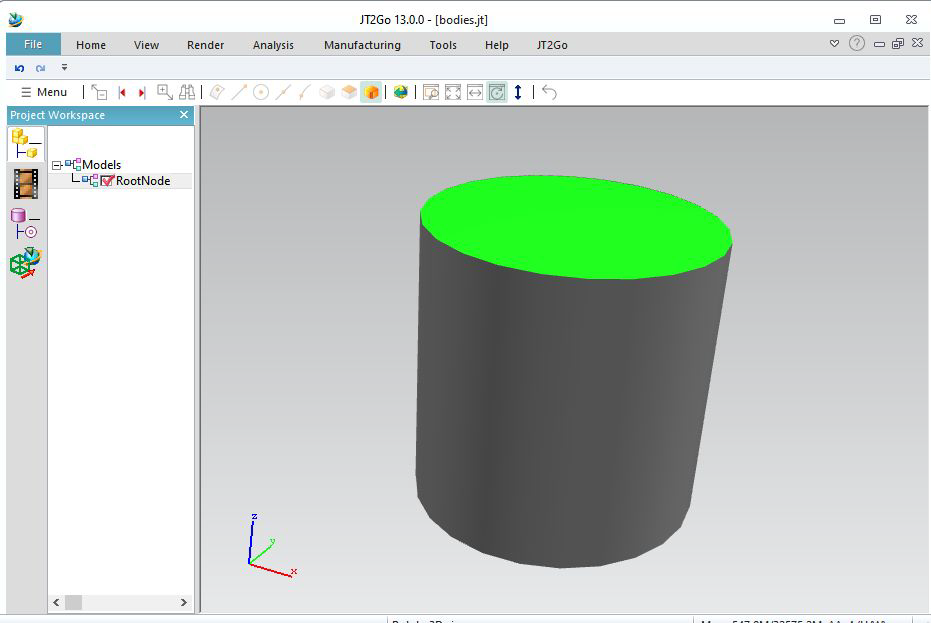
This sample initialises the tessellation, and writes a cylinder with a green face, and the others uncolored.
Then use function jtw_AddBody to write the body.

Level of detail (LOD) (2.2)

Datakit Jt Writer allows to write multiple level of details.

//start_of_jtwsample22
{
Dtk_ErrorStatus errorStatus;
Dtk_Jtw_Interface jtWriter(inOutputFileName, errorStatus, Dtk_Jtw_Interface::xtbrep); // Specify allowing BREP Writing
CHECK_OK(errorStatus);
CHECK_OK(jtWriter.OpenInstance("RootNode")); // Rootnode creation
Dtk_BodyPtr cylinder = sampleWriter::CreateCyl(1, 2); // Create a Cylinder radius=1, height=2 (with a green face)
CHECK_OK(jtWriter.AddBody(cylinder)); // Add the body, tessellated as default tess_InitTesselation value
Dtk_BodyPtr cylinder2 = sampleWriter::CreateCyl(1, 2); // Create another Cylinder radius=1, height=2 (with a green face)
Shift(cylinder2, 3); // shift the cylinder, see exemple above
Dtk_tab<Dtk_Float32> lods; // create a LOD array
lods.push_back(0.001f); lods.push_back(-1); // Highest LOD : linear tol = 0.001, angular automatic
lods.push_back(0.01f); lods.push_back(-1); // Medium LOD : linear tol = 0.01, angular automatic
lods.push_back(0.1f); lods.push_back(-1); // Lower LOD : linear tol = 0.1, angular automatic
CHECK_OK(jtWriter.AddBody(cylinder2, lods)); // add the body, will tessellate automaticly for LODS.
CHECK_OK(jtWriter.CloseLastInstance()); // Rootnode closing.
std::cout << "=> " << inOutputFileName.c_str() << std::endl;
return dtkNoError;// Automatic Finish while J released
}
//end_of_jtwsample22

This example writes 2 bodies. The first one is like the previous sample. Tessellated with default linear tolerance as 0.005, see function tess_InitTessellation
Then we fill an array of LODS (0.001,-1) ; (0.01,-1) ; (0.1,-1) ;
The function jtw_AddBodyMultiLOD will tessellate 3 times at different tolerances.
We can add up to 9 LODS. Because tesselation takes 2 parameters, numbers of LODS will be sizeof array divided by 2.

A good way to see result is, inside JT2Go, to right click on the background, then :
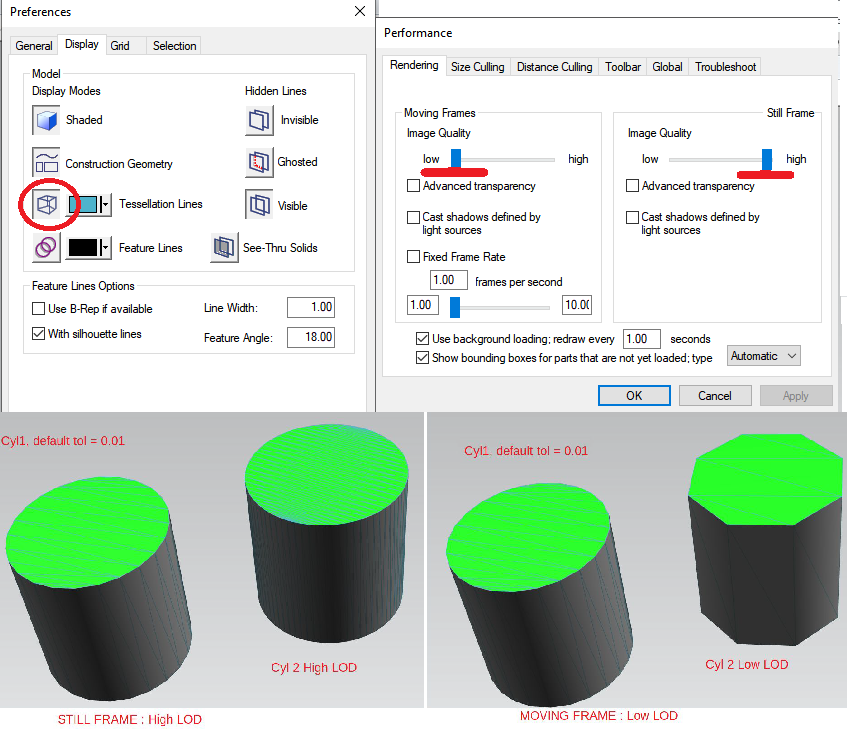
  • In preference menu, show the tessellation lines
  • In the performance menu, keep the maximum level of detail for Still Frame, and minimum for moving frames. You will see the level of detail changing while moving.

Wire Body (2.3)

Fill a Dtk_Body with wire curves, and Datakit Jt Writer will write it as Wireframe segment as NURBS, and will also tessellate it as wire meshes.

//start_of_jtwsample23
{
Dtk_ErrorStatus errorStatus;
Dtk_Jtw_Interface jtWriter(inOutputFileName, errorStatus, Dtk_Jtw_Interface::xtbrep); // Specify allowing BREP Writing
CHECK_OK(errorStatus);
CHECK_OK(jtWriter.OpenInstance("RootNode")); // Rootnode creation
CHECK_OK(jtWriter.AddBody(wire));
CHECK_OK(jtWriter.AddBody(wire2));
CHECK_OK(jtWriter.CloseLastInstance()); // Rootnode closing.
std::cout << "=> " << inOutputFileName.c_str() << std::endl;
return dtkNoError;// Automatic Finish while J released
}
//end_of_jtwsample23

We can set curve colors, thickness, and style filling info field of each curve
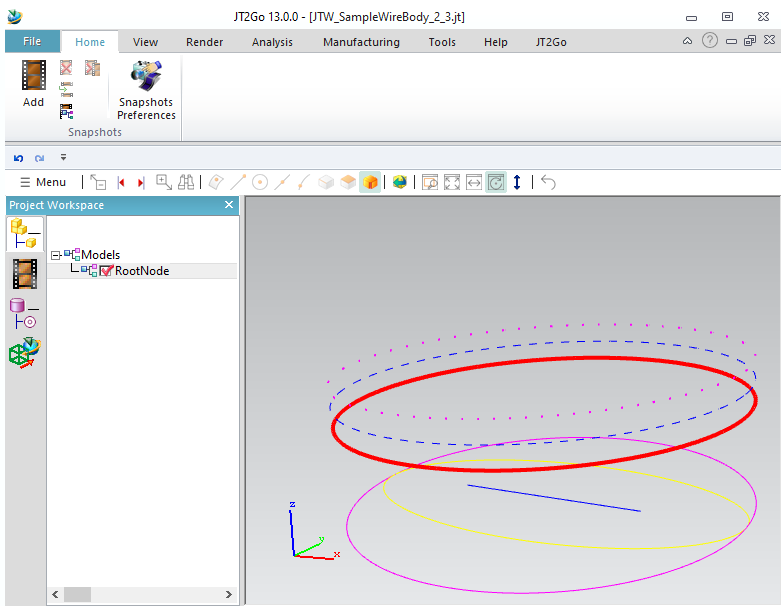
ellipsedotted->info()->SetColor(Dtk_RGB(255, 0, 255));
ellipsedotted->info()->SetCurveLineType(DTK_DOTTED);
ellipsedotted->info()->SetCurveThickNessInMM(2);

Bodies visibility (2.4)

It is possible to hide a body. Just set blanked status on its info field. It also works with meshes.

//start_of_jtwsample24
{
Dtk_ErrorStatus errorStatus;
Dtk_Jtw_Interface jtWriter(inOutputFileName, errorStatus, Dtk_Jtw_Interface::xtbrep); // Specify allowing BREP Writing
CHECK_OK(errorStatus);
CHECK_OK(jtWriter.OpenInstance("RootNode")); // Rootnode creation
CHECK_OK(jtWriter.AddBody(cylinder));
Shift(cylinder2, 3);
CHECK_OK(jtWriter.AddBody(cylinder2));
Shift(cylinder3, 6);
cylinder3->info()->SetBlankedStatus(DTK_TRUE);
CHECK_OK(jtWriter.AddBody(cylinder3));
CHECK_OK(jtWriter.CloseLastInstance()); // Rootnode closing.
std::cout << "=> " << inOutputFileName.c_str() << std::endl;
return dtkNoError;// Automatic Finish while J released
}
//end_of_jtwsample24

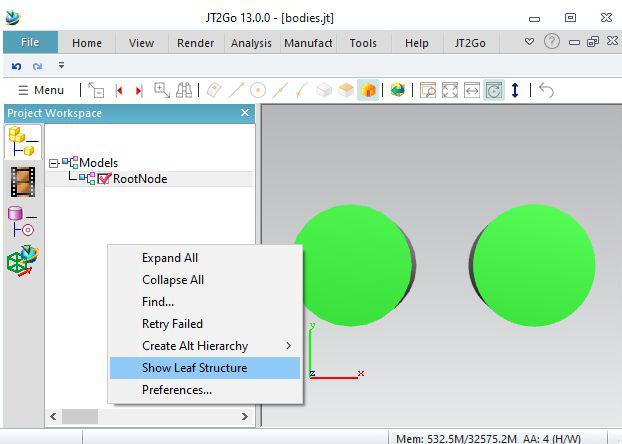
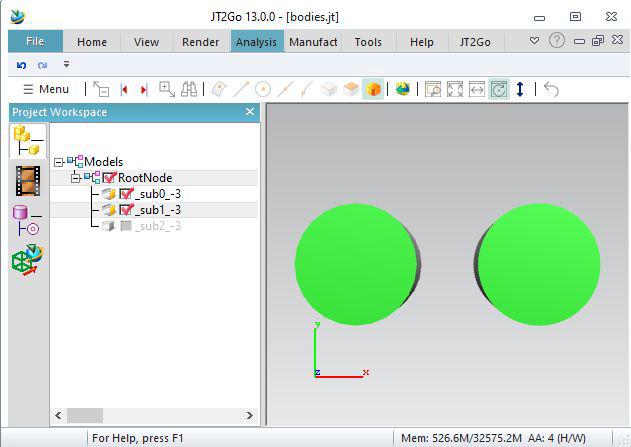
In our sample, we add 3 bodies on the same part. It is possible to see them in Jt2Go, by right
clicking into the project workshpace, enable « show leaf structure ».
Our bodies are considerated as « subnodes »
We see that the last body became invisible.

Lightmaps (2.5)

This sample allow to write lightmaps

//start_of_jtwsample25
void SetLightMapOnOneFace( Dtk_BodyPtr& inoutBody, const Dtk_RGB& inAmbient, const Dtk_RGB& inDiffuse,
const Dtk_RGB& inSpecular, float inShininess )
{
size_t idx, nb = inoutBody->GetNumTopologicalEntities( DTK_TYPE_UNKNOWN );
for( idx = 0; idx < nb; idx++ )
{// fetch first face, then abort
Dtk_TopologicalEntityPtr topo = inoutBody->GetPtr( (Dtk_ID)idx );
if( topo.IsNULL() || topo->get_type_detk() != DTK_TYPE_FACE )
continue;
Dtk_LightMapPtr lightmap = Dtk_LightMap::Create( inAmbient, inDiffuse, inSpecular );
lightmap->SetShininessRatio( inShininess );
Dtk_RenderInfosPtr render = Dtk_RenderInfos::Create( "uselessname", lightmap, NULL );
face->info()->AddRenderInfos( render );
break;
}
}
{
Dtk_ErrorStatus errorStatus;
Dtk_Jtw_Interface jtWriter( inOutputFileName, errorStatus, Dtk_Jtw_Interface::xtbrep ); // Specify allowing BREP Writing
CHECK_OK( errorStatus );
CHECK_OK( jtWriter.OpenInstance( "RootNode" ) ); // Rootnode creation
SetLightMapOnOneFace( cylinder, Dtk_RGB( 50, 50, 50 ), Dtk_RGB( 255, 0, 0 ), Dtk_RGB( 0, 0, 255 ), 0 );
CHECK_OK( jtWriter.AddBody( cylinder ) );
Dtk_BodyPtr cylinder2 = sampleWriter::CreateCyl( 1, 2 );
Shift( cylinder2, 3 );
SetLightMapOnOneFace( cylinder2, Dtk_RGB( 50, 50, 50 ), Dtk_RGB( 255, 0, 0 ), Dtk_RGB( 0, 0, 0 ), 0.5 );
CHECK_OK( jtWriter.AddBody( cylinder2 ) );
Dtk_BodyPtr cylinder3 = sampleWriter::CreateCyl( 1, 2 );
Shift( cylinder3, 6 );
SetLightMapOnOneFace( cylinder3, Dtk_RGB( 100, 50, 30 ), Dtk_RGB( 255, 0, 0 ), Dtk_RGB( 255, 255, 255 ), 1 );
CHECK_OK( jtWriter.AddBody( cylinder3 ) );
CHECK_OK( jtWriter.CloseLastInstance() ); // Rootnode closing.
std::cout << "=> " << inOutputFileName.c_str() << std::endl;
return dtkNoError;// Automatic Finish while J released
}
//end_of_jtwsample25

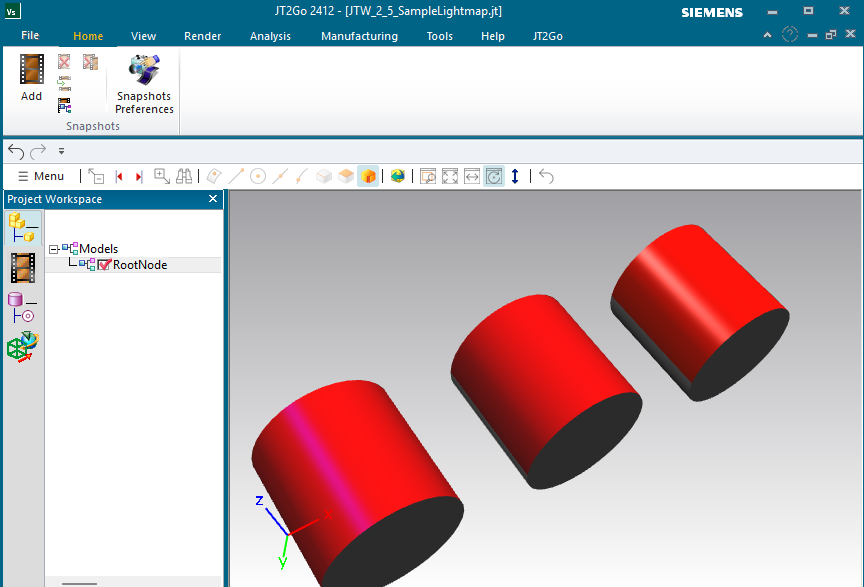
Usually, we define colors using SetColor. But JT allows to set more parameters. So we can define a Dtk_LightmapPtr, and set it using Dtk_RenderInfoPtr, as you see in sample code.

We set in this sample the first face of each cylinder with different options. The first one has purple specular color, and no shininess. The second has no specular colors : it looks like matte and smooth. The last one has white specular color with shininess : it looks like brillant metal.

Note that you can combine Lightmap and textures (see section 1.3) into Dtk_RenderInfoPtr for meshes. (only meshes can hold textures).

Lossy compression (2.6)

This sample allow to make internal lossy compression to save disk space

//start_of_jtwsample26
{
Dtk_ErrorStatus errorStatus;
Dtk_Jtw_Interface jtWriter( inOutputFileName, errorStatus, Dtk_Jtw_Interface::xtbrep ); // Specify allowing BREP Writing
CHECK_OK( errorStatus );
CHECK_OK( jtWriter.OpenInstance( "RootNode" ) ); // Rootnode creation
Dtk_BodyPtr cylinder = sampleWriter::CreateCyl( 1, 2 ); // Create a Cylinder radius=1, height=2 (with a green face)
CHECK_OK( jtWriter.AddBody( cylinder ) ); // Add the body, tessellated as default tess_InitTesselation value
Dtk_BodyPtr cylinder2 = sampleWriter::CreateCyl( 1, 2 ); // Create another Cylinder radius=1, height=2 (with a green face)
Shift( cylinder2, 3 ); // shift the cylinder, see exemple above
Dtk_tab<Dtk_Float32> lods; // create a LOD array
lods.push_back( 0.001f ); lods.push_back( -1 ); // Highest LOD : linear tol = 0.001, angular automatic
lods.push_back( 0.01f ); lods.push_back( -1 ); // Medium LOD : linear tol = 0.01, angular automatic
lods.push_back( 0.1f ); lods.push_back( -1 ); // Lower LOD : linear tol = 0.1, angular automatic
CHECK_OK( jtWriter.AddBody( cylinder2, lods , 0.01f ) ); // add the body, will tessellate automaticly for LODS, and a Lossy factor of 0.01
CHECK_OK( jtWriter.CloseLastInstance() ); // Rootnode closing.
std::cout << "=> " << inOutputFileName.c_str() << std::endl;
return dtkNoError;// Automatic Finish while J released
}
//end_of_jtwsample26

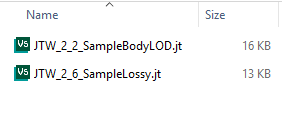
Let's get back on exemple 2.4. This one is almost the same : only an extra parameter has been added to function AddBody This is an optional parameter to define the lossy compression.

JT compress its datas internally. Meshes are made with a lot of floating point coordinates. These numbers have several digits, and storing all costs in compression. The lossy compression allows each point to be shifted to decrease the number of digts to store. The maximum shift allowed is the parameter given. So we understand that the default value of this parameter is 0.0 : means not shift anything at all, keeping a lossless compression.

Note that, contrary to LOD, the number of triangle is kept. Only the precision is affected. in our case 0.01 maximum for each point) It also affect normals.

This can be good for visualisation, but it should be avoided if you want to keep exact geometry.

On the result, we see this example is lighter than the LOD example. For big files, difference is more significant.

This parameter can be given to AddBody, and also AddMesh.

Assemblies


Simple assembly (3.1)

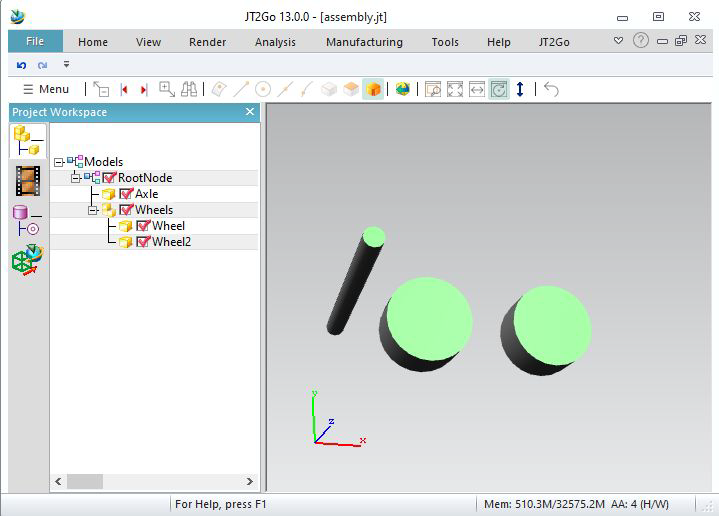
Here is an example to write an assembly, with sub assembly. No instances here, so « wheel » will be written twice in the file.
//start_of_jtwsample31
{
Dtk_ErrorStatus errorStatus;
Dtk_Jtw_Interface jtWriter(inOutputFileName, errorStatus, Dtk_Jtw_Interface::xtbrep); // Specify allowing BREP Writing
CHECK_OK(errorStatus);
CHECK_OK(jtWriter.OpenInstance("RootNode")); // Rootnode creation
CHECK_OK(jtWriter.OpenInstance("Axle")); // open
CHECK_OK(jtWriter.AddBody(axle));
CHECK_OK(jtWriter.CloseLastInstance()); // close Axle
CHECK_OK(jtWriter.OpenInstance("Wheels")); // open
CHECK_OK(jtWriter.OpenInstance("Wheel")); // open
Shift(wheel, 2);
CHECK_OK(jtWriter.AddBody(wheel));
CHECK_OK(jtWriter.CloseLastInstance()); // close Wheel
CHECK_OK(jtWriter.OpenInstance("Wheel2")); // open
Shift(wheel, 3);
CHECK_OK(jtWriter.AddBody(wheel));
CHECK_OK(jtWriter.CloseLastInstance()); // close Wheel
CHECK_OK(jtWriter.CloseLastInstance()); // close Wheels
CHECK_OK(jtWriter.CloseLastInstance()); // close RootNode
std::cout << "=> " << inOutputFileName.c_str() << std::endl;
return dtkNoError;// Automatic Finish while J released
}
//end_of_jtwsample31

Instances (3.2)

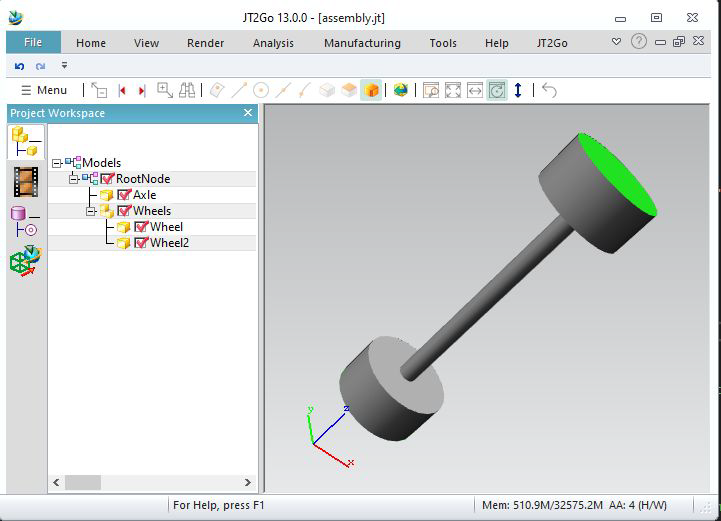
We can re-instantiate a part. The first time we call OpenInstance « Wheel », we give a custom ID for the part « wheel ». Here id_of_wheel, it needs to be a positive number.
Datakit JtWrite will store this ID, and when we call again OpenInstance with same ID, the writer automaticly re-instantiates the wheel. You must close the child.v
We provide a different Dtk_transfo (a placement matrix) for each instance, even a different name (wheel and wheel2) is possible.
This time, the wheel is stored once in the JT file.
//start_of_jtwsample32
{
Dtk_dir X(1, 0, 0);
Dtk_dir Y(0, 1, 0);
Dtk_dir Z(0, 0, 1);
Dtk_ErrorStatus errorStatus;
Dtk_Jtw_Interface jtWriter(inOutputFileName, errorStatus, Dtk_Jtw_Interface::xtbrep); // Specify allowing BREP Writing
CHECK_OK(errorStatus);
CHECK_OK(jtWriter.OpenInstance("RootNode")); // Rootnode creation
CHECK_OK(jtWriter.OpenInstance("Axle")); // open
CHECK_OK(jtWriter.AddBody(axle));
CHECK_OK(jtWriter.CloseLastInstance()); // close Axle
CHECK_OK(jtWriter.OpenInstance("Wheels")); // open
Dtk_Int64 id_of_wheel = 1;
CHECK_OK(jtWriter.OpenInstance("Wheel", id_of_wheel, Dtk_transfo(X, Y, Z, Dtk_pnt(0, 0, 5)))); // open instance
CHECK_OK(jtWriter.AddBody(wheel));
CHECK_OK(jtWriter.CloseLastInstance()); // close Wheel
CHECK_OK(jtWriter.OpenInstance("Wheel2", id_of_wheel, Dtk_transfo(X, -Y, -Z, Dtk_pnt()))); // open reinstance
CHECK_OK(jtWriter.CloseLastInstance()); // reinstancied : must close Wheel immediatly.
CHECK_OK(jtWriter.CloseLastInstance()); // close Wheels
CHECK_OK(jtWriter.CloseLastInstance()); // close RootNode
std::cout << "=> " << inOutputFileName.c_str() << std::endl;
return dtkNoError;// Automatic Finish while J released
}
//end_of_jtwsample32

Instances of subassembly (3.3)

We can re-instantiate full subassembly. Here, we give an ID of 2 to Axles, and at the end we reuse it with another transformation.
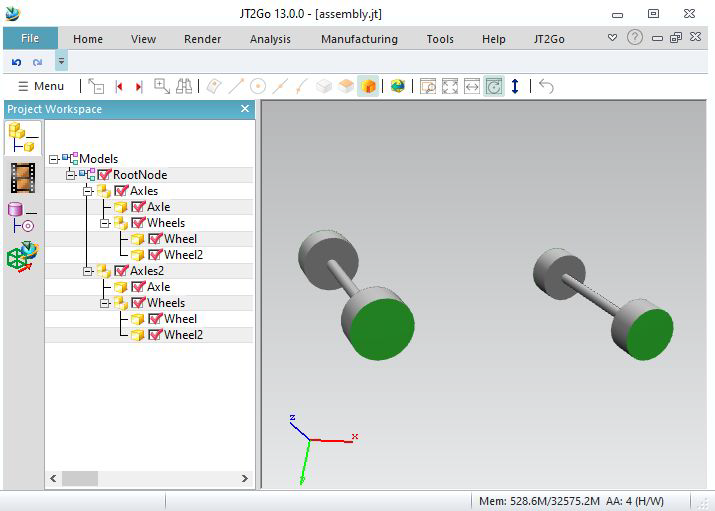
//start_of_jtwsample33
{
Dtk_dir X(1, 0, 0);
Dtk_dir Y(0, 1, 0);
Dtk_dir Z(0, 0, 1);
Dtk_ErrorStatus errorStatus;
Dtk_Jtw_Interface jtWriter(inOutputFileName, errorStatus, Dtk_Jtw_Interface::xtbrep); // Specify allowing BREP Writing
CHECK_OK(errorStatus);
CHECK_OK(jtWriter.OpenInstance("RootNode")); // Rootnode creation
Dtk_Int64 id_of_axles = 2;
CHECK_OK(jtWriter.OpenInstance("Axles", id_of_axles)); // open Axles, give an ID for future reinstance, placement by default : identity matrix
CHECK_OK(jtWriter.OpenInstance("Axle")); // open
CHECK_OK(jtWriter.AddBody(axle));
CHECK_OK(jtWriter.CloseLastInstance()); // close Axle
CHECK_OK(jtWriter.OpenInstance("Wheels")); // open
Dtk_Int64 id_of_wheel = 1;
CHECK_OK(jtWriter.OpenInstance("Wheel", id_of_wheel, Dtk_transfo(X, Y, Z, Dtk_pnt(0, 0, 5)))); // open instance
CHECK_OK(jtWriter.AddBody(wheel));
CHECK_OK(jtWriter.CloseLastInstance()); // close Wheel
CHECK_OK(jtWriter.OpenInstance("Wheel2", id_of_wheel, Dtk_transfo(X, -Y, -Z, Dtk_pnt()))); // open reinstance
CHECK_OK(jtWriter.CloseLastInstance()); // reinstancied : must close Wheel immediatly.
CHECK_OK(jtWriter.CloseLastInstance()); // close Wheels
CHECK_OK(jtWriter.CloseLastInstance()); // close Axles
CHECK_OK(jtWriter.OpenInstance("Axles2", 2, Dtk_transfo(X, Y, Z, Dtk_pnt(10, 0, 0)))); // reinstance whole subassembly with matrix
CHECK_OK(jtWriter.CloseLastInstance()); // reinstancied : must close Wheel immediatly.
CHECK_OK(jtWriter.CloseLastInstance()); // close RootNode
std::cout << "=> " << inOutputFileName.c_str() << std::endl;
return dtkNoError;// Automatic Finish while J released
}
//end_of_jtwsample33

Instance colors and transparency (3.4)

We can give colors to instances.
Let's take previous example.
Use LastInstance_SetInstanceColor to set colors on instances.
We re-instantiate Axles2 with a red color, and an alpha as 128 : transparency. But the last parameter "keepsubcolor" tells only uncolored colors are filled. (so green faces stay green)
For Axles3, we give a blue color, but the last parameter "overwritecolor" tells all is filled, even the green faces.
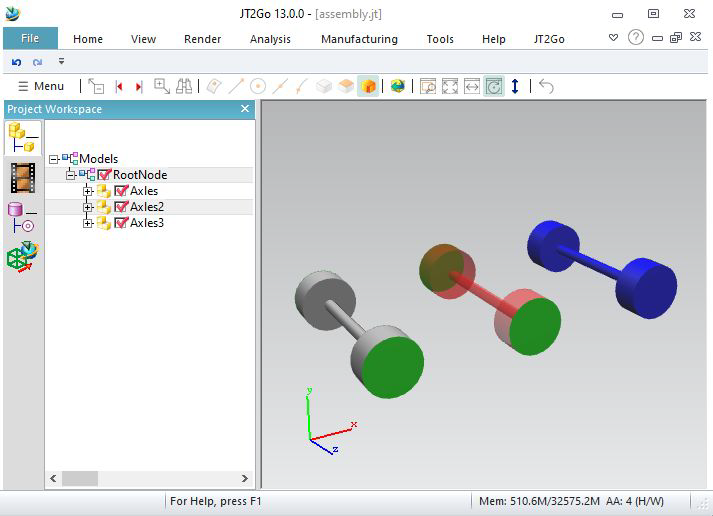
//start_of_jtwsample34
{
Dtk_dir X(1, 0, 0);
Dtk_dir Y(0, 1, 0);
Dtk_dir Z(0, 0, 1);
Dtk_ErrorStatus errorStatus;
Dtk_Jtw_Interface jtWriter(inOutputFileName, errorStatus, Dtk_Jtw_Interface::xtbrep); // Specify allowing BREP Writing
CHECK_OK(errorStatus);
CHECK_OK(jtWriter.OpenInstance("RootNode")); // Rootnode creation
Dtk_Int64 id_of_axles = 2;
CHECK_OK(jtWriter.OpenInstance("Axles", id_of_axles)); // open Axles, give an ID for future reinstance, placement by default : identity matrix
CHECK_OK(jtWriter.OpenInstance("Axle")); // open
CHECK_OK(jtWriter.AddBody(axle));
CHECK_OK(jtWriter.CloseLastInstance()); // close Axle
CHECK_OK(jtWriter.OpenInstance("Wheels")); // open
Dtk_Int64 id_of_wheel = 1;
CHECK_OK(jtWriter.OpenInstance("Wheel", id_of_wheel, Dtk_transfo(X, Y, Z, Dtk_pnt(0, 0, 5)))); // open instance
CHECK_OK(jtWriter.AddBody(wheel));
CHECK_OK(jtWriter.CloseLastInstance()); // close Wheel
CHECK_OK(jtWriter.OpenInstance("Wheel2", id_of_wheel, Dtk_transfo(X, -Y, -Z, Dtk_pnt()))); // open reinstance
CHECK_OK(jtWriter.CloseLastInstance()); // reinstancied : must close Wheel immediatly.
CHECK_OK(jtWriter.CloseLastInstance()); // close Wheels
CHECK_OK(jtWriter.CloseLastInstance()); // close Axles
CHECK_OK(jtWriter.OpenInstance("Axles2", id_of_axles, Dtk_transfo(X, Y, Z, Dtk_pnt(5, 0, 0))));
CHECK_OK(jtWriter.LastInstance_SetInstanceColor(Dtk_RGB(255, 0, 0, 128), Dtk_Jtw_Interface::keepsubcolor));
// Give a RED color with transparence, with keepsubcolor strategy : only uncolored faces are filled
CHECK_OK(jtWriter.CloseLastInstance()); // close Axles2
CHECK_OK(jtWriter.OpenInstance("Axles3", id_of_axles, Dtk_transfo(X, Y, Z, Dtk_pnt(10, 0, 0))));
CHECK_OK(jtWriter.LastInstance_SetInstanceColor(Dtk_RGB(0, 0, 255), Dtk_Jtw_Interface::overwritecolor));
// Give a BLUE color, with overwrite color strategy : all faces are filled
CHECK_OK(jtWriter.CloseLastInstance()); // close Axles2
CHECK_OK(jtWriter.CloseLastInstance()); // close RootNode
std::cout << "=> " << inOutputFileName.c_str() << std::endl;
return dtkNoError;// Automatic Finish while J released
}
//end_of_jtwsample34

Instance visibility (3.5)

Get back to example 3.2.
Using LastInstance_SetInvisible will hide an instance.
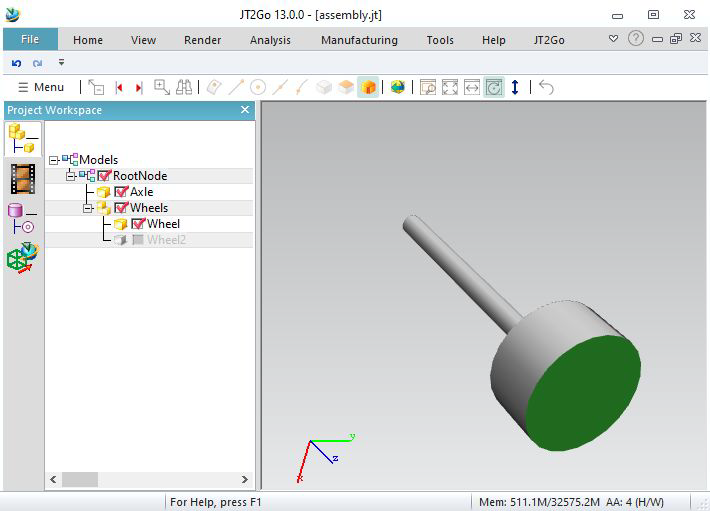
//start_of_jtwsample35
{
Dtk_dir X(1, 0, 0);
Dtk_dir Y(0, 1, 0);
Dtk_dir Z(0, 0, 1);
Dtk_ErrorStatus errorStatus;
Dtk_Jtw_Interface jtWriter(inOutputFileName, errorStatus, Dtk_Jtw_Interface::xtbrep); // Specify allowing BREP Writing
CHECK_OK(errorStatus);
CHECK_OK(jtWriter.OpenInstance("RootNode")); // Rootnode creation
CHECK_OK(jtWriter.OpenInstance("Axle")); // open
CHECK_OK(jtWriter.AddBody(axle));
CHECK_OK(jtWriter.CloseLastInstance()); // close Axle
CHECK_OK(jtWriter.OpenInstance("Wheels")); // open
Dtk_Int64 id_of_wheel = 1;
CHECK_OK(jtWriter.OpenInstance("Wheel", id_of_wheel, Dtk_transfo(X, Y, Z, Dtk_pnt(0, 0, 5)))); // open instance
CHECK_OK(jtWriter.AddBody(wheel));
CHECK_OK(jtWriter.CloseLastInstance()); // close Wheel
CHECK_OK(jtWriter.OpenInstance("Wheel2", id_of_wheel, Dtk_transfo(X, -Y, -Z, Dtk_pnt())));
CHECK_OK(jtWriter.LastInstance_SetInvisible()); // Set as invisible
CHECK_OK(jtWriter.CloseLastInstance()); // reinstancied : must close Wheel immediatly.
CHECK_OK(jtWriter.CloseLastInstance()); // close Wheels
CHECK_OK(jtWriter.CloseLastInstance()); // close RootNode
std::cout << "=> " << inOutputFileName.c_str() << std::endl;
return dtkNoError;// Automatic Finish while J released
}
//end_of_jtwsample35

Multiple output files, per part (3.6)

Jt allows to write multiple files.
Let's get the 3.3 example.
Here we call OpenInstance with « assembly/wheel.jt » and « assembly/axle.jt », it will write a new file for this part, into a new folder
(the main file’s name is «JTW_SampleMultipleFilesPerPart_3_6.jt » on this sample, seejtw_InitWrite).

//start_of_jtwsample36
{
Dtk_dir X(1, 0, 0);
Dtk_dir Y(0, 1, 0);
Dtk_dir Z(0, 0, 1);
Dtk_ErrorStatus errorStatus;
Dtk_Jtw_Interface jtWriter(inOutputFileName, errorStatus, Dtk_Jtw_Interface::xtbrep); // Specify allowing BREP Writing
CHECK_OK(errorStatus);
CHECK_OK(jtWriter.OpenInstance("RootNode")); // Rootnode creation
Dtk_Int64 id_of_axles = 2;
CHECK_OK(jtWriter.OpenInstance("Axles", id_of_axles)); // open Axles, give an ID for future reinstance, placement by default : identity matrix
CHECK_OK(jtWriter.OpenInstance("Axle",Dtk_transfo(), "assembly/axle.jt"));// open instance in a new file.
CHECK_OK(jtWriter.AddBody(axle));
CHECK_OK(jtWriter.CloseLastInstance()); // close Axle
CHECK_OK(jtWriter.OpenInstance("Wheels")); // open
Dtk_Int64 id_of_wheel = 1;
CHECK_OK(jtWriter.OpenInstance("Wheel", id_of_wheel, Dtk_transfo(X, Y, Z, Dtk_pnt(0, 0, 5)), "assembly/wheel.jt"));
CHECK_OK(jtWriter.AddBody(wheel));
CHECK_OK(jtWriter.CloseLastInstance()); // close Wheel
CHECK_OK(jtWriter.OpenInstance("Wheel2", id_of_wheel, Dtk_transfo(X, -Y, -Z, Dtk_pnt()))); // open reinstance
CHECK_OK(jtWriter.CloseLastInstance()); // reinstancied : must close Wheel immediatly.
CHECK_OK(jtWriter.CloseLastInstance()); // close Wheels
CHECK_OK(jtWriter.CloseLastInstance()); // close Axles
CHECK_OK(jtWriter.OpenInstance("Axles2", 2, Dtk_transfo(X, Y, Z, Dtk_pnt(10, 0, 0)))); // reinstance whole subassembly with matrix
CHECK_OK(jtWriter.CloseLastInstance()); // close Axles2
CHECK_OK(jtWriter.CloseLastInstance()); // close RootNode
std::cout << "=> " << inOutputFileName.c_str() << std::endl;
return dtkNoError;// Automatic Finish while J released
}
//end_of_jtwsample36

Multiple output files, shattered files (3.7)

It is also possible to create JT files for each internal node :
We see a new JT file for each OpenInstance (that is neither re-instantiate nor the root)
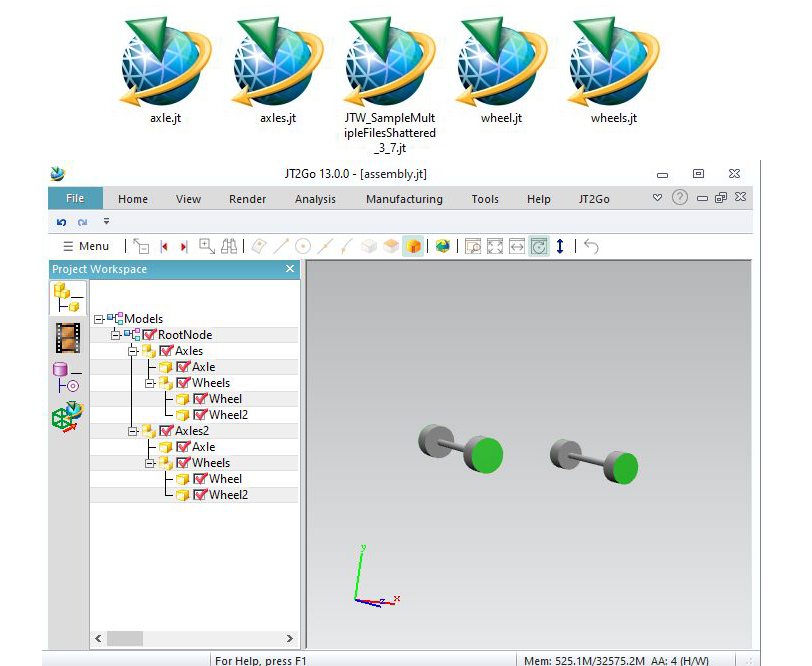
//start_of_jtwsample37
{
Dtk_dir X(1, 0, 0);
Dtk_dir Y(0, 1, 0);
Dtk_dir Z(0, 0, 1);
Dtk_ErrorStatus errorStatus;
Dtk_Jtw_Interface jtWriter(inOutputFileName, errorStatus, Dtk_Jtw_Interface::xtbrep); // Specify allowing BREP Writing
CHECK_OK(errorStatus);
CHECK_OK(jtWriter.OpenInstance("RootNode")); // Rootnode creation
Dtk_Int64 id_of_axles = 2;
CHECK_OK(jtWriter.OpenInstance("Axles", id_of_axles, Dtk_transfo(), "shattered_axles.jt")); // open Axles, give an ID for future reinstance, open instance in a new file.
CHECK_OK(jtWriter.OpenInstance("Axle", Dtk_transfo(), "shattered_axle.jt")); // open instance in a new file.
CHECK_OK(jtWriter.AddBody(axle));
CHECK_OK(jtWriter.CloseLastInstance()); // close Axle
CHECK_OK(jtWriter.OpenInstance("Wheels", Dtk_transfo(), "shattered_wheels.jt")); // open instance in a new file.
Dtk_Int64 id_of_wheel = 1;
CHECK_OK(jtWriter.OpenInstance("Wheel", id_of_wheel, Dtk_transfo(X, Y, Z, Dtk_pnt(0, 0, 5)), "shattered_wheel.jt")); // open instance in a new file.
CHECK_OK(jtWriter.AddBody(wheel));
CHECK_OK(jtWriter.CloseLastInstance()); // close Wheel
CHECK_OK(jtWriter.OpenInstance("Wheel2", id_of_wheel, Dtk_transfo(X, -Y, -Z, Dtk_pnt()))); // open reinstance
CHECK_OK(jtWriter.CloseLastInstance()); // reinstancied : must close Wheel immediatly."
CHECK_OK(jtWriter.CloseLastInstance()); // close Wheels
CHECK_OK(jtWriter.CloseLastInstance()); // close Axles
CHECK_OK(jtWriter.OpenInstance("Axles2", 2, Dtk_transfo(X, Y, Z, Dtk_pnt(10, 0, 0)))); // reinstance whole subassembly with matrix
CHECK_OK(jtWriter.CloseLastInstance()); // close Axles2
CHECK_OK(jtWriter.CloseLastInstance()); // close RootNode
std::cout << "=> " << inOutputFileName.c_str() << std::endl;
return dtkNoError;// Automatic Finish while J released
}
//end_of_jtwsample37

Additionnal datas


Writing version (4.1)

Datakit JtWrite versions 8.0 ; 9.0 ; 9.1 ; 9.2 ; 9.3 ; 9.4 ; 9.5 ; 10.0 ; 10.1 ; 10.2 ; 10.3 ; 10.4 ; 10.5 ; 10.6 ; 10.7
We can choose the version to write in constructor. Default is version 9.5

//start_of_jtwsample41
{
Dtk_ErrorStatus errorStatus;
Dtk_Jtw_Interface jtWriter(inOutputFileName, errorStatus, Dtk_Jtw_Interface::xtbrep, Dtk_Jtw_Interface::version80); // set version 8.0
CHECK_OK(errorStatus);
CHECK_OK(jtWriter.OpenInstance("RootNode")); // Rootnode creation
Dtk_MeshPtr CubeMesh = sampleWriter::CreateMeshCube(); // create a simple red cube
CHECK_OK(jtWriter.AddMesh(CubeMesh)); // write the cube
CHECK_OK(jtWriter.CloseLastInstance()); // Rootnode closing.
std::cout << "=> " << inOutputFileName.c_str() << std::endl;
return dtkNoError;// Automatic Finish while J released
}
//end_of_jtwsample41

Units (4.2)

You can choose unit for your file.
Available units are millimeters, centimeters, meters, inches, feet, yards, micrometers, decimeters, kilometers, mils, miles. By default, units are millimeters
You can check this in Jt2Go using the Analysis menu, and make measurements
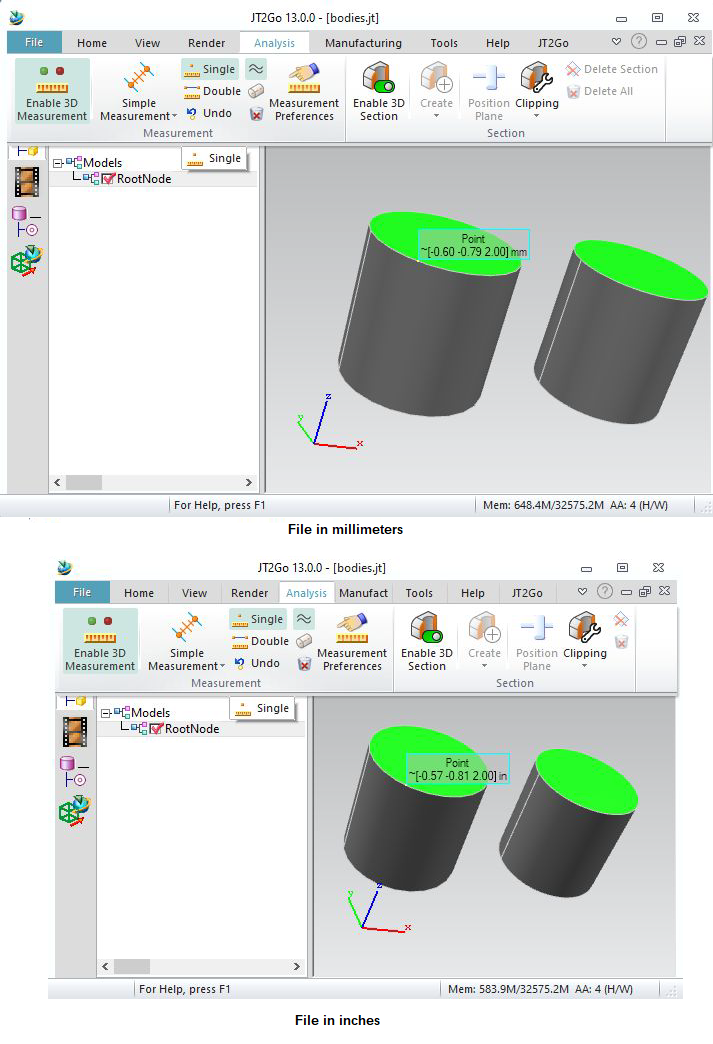
//start_of_jtwsample42
{
Dtk_ErrorStatus errorStatus;
// set units as inches
CHECK_OK(errorStatus);
CHECK_OK(jtWriter.OpenInstance("RootNode")); // Rootnode creation
Dtk_MeshPtr CubeMesh = sampleWriter::CreateMeshCube(); // create a simple red cube
CHECK_OK(jtWriter.AddMesh(CubeMesh)); // write the cube
CHECK_OK(jtWriter.CloseLastInstance()); // Rootnode closing.
std::cout << "=> " << inOutputFileName.c_str() << std::endl;
return dtkNoError;// Automatic Finish while J released
}
//end_of_jtwsample42

Metadatas (4.3)

Metadatas can be written for each child. We can write several metadats for each child.
Here, we write « MyTitle » with « MyValue » for RootNode.
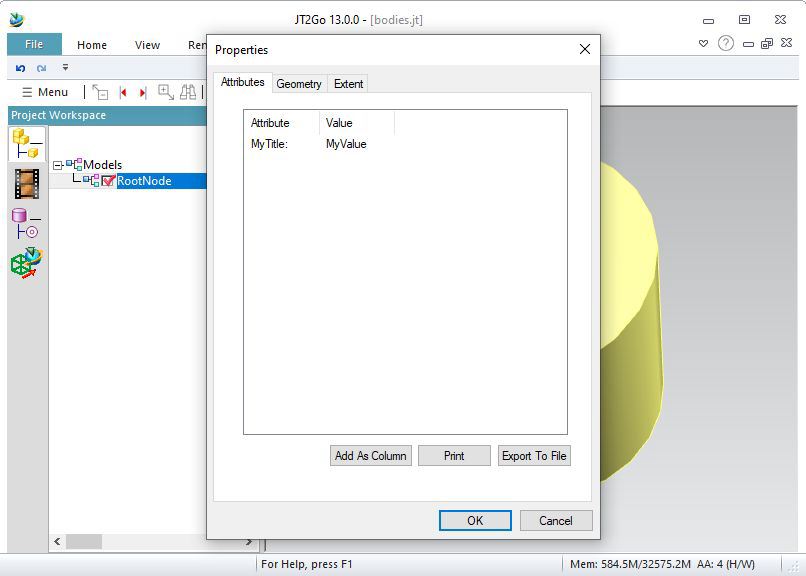
//start_of_jtwsample43
{
Dtk_ErrorStatus errorStatus;
Dtk_Jtw_Interface jtWriter(inOutputFileName, errorStatus, Dtk_Jtw_Interface::xtbrep); // Specify allowing BREP Writing
CHECK_OK(errorStatus);
CHECK_OK(jtWriter.OpenInstance("RootNode")); // Rootnode creation
CHECK_OK(jtWriter.AddMetaData(meta));
Dtk_BodyPtr cylinder = sampleWriter::CreateCyl(1, 2); // Create a Cylinder radius=1, height=2 (with a green face)
CHECK_OK(jtWriter.AddBody(cylinder)); // Add the body
CHECK_OK(jtWriter.CloseLastInstance()); // Rootnode closing.
std::cout << "=> " << inOutputFileName.c_str() << std::endl;
return dtkNoError;// Automatic Finish while J released
}
//end_of_jtwsample43

Layers (4.4)

Fill layer of body info field (or mesh info field) to write layers on the corresponding node.
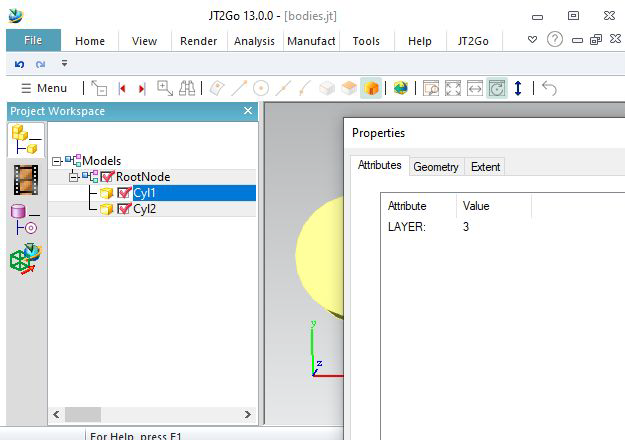
//start_of_jtwsample44
{
Dtk_ErrorStatus errorStatus;
Dtk_Jtw_Interface jtWriter(inOutputFileName, errorStatus, Dtk_Jtw_Interface::xtbrep); // Specify allowing BREP Writing
CHECK_OK(errorStatus);
CHECK_OK(jtWriter.OpenInstance("RootNode")); // Rootnode creation
CHECK_OK(jtWriter.OpenInstance("Cyl1"));
cylinder->info()->SetLayer(3);
CHECK_OK(jtWriter.AddBody(cylinder)); // Add the body
CHECK_OK(jtWriter.CloseLastInstance());
CHECK_OK(jtWriter.OpenInstance("Cyl2"));
cylinder2->info()->SetLayer(5);
Shift(cylinder2, 3);
CHECK_OK(jtWriter.AddBody(cylinder2)); // Add the body
CHECK_OK(jtWriter.CloseLastInstance());
CHECK_OK(jtWriter.CloseLastInstance()); // Rootnode closing.
std::cout << "=> " << inOutputFileName.c_str() << std::endl;
return dtkNoError;// Automatic Finish while J released
}
//end_of_jtwsample44

Layer names (4.5)

Here is a function to create a Dtk_LayerInfoSetPtr.
Just after the creation of RootNode, call AddLayerInfoSet. These datas are stored as properties into the RootNode.
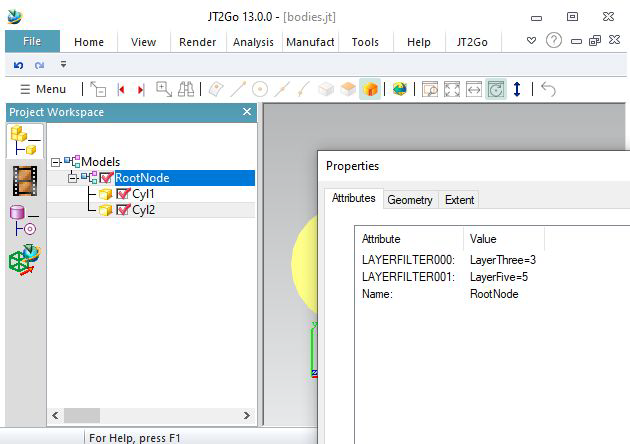
//start_of_jtwsample45
{
lay->AddLayer( Dtk_LayerInfosSet::Layer( 3, L"LayerThree" ) ); // first layer has ID 3
lay->AddLayer( Dtk_LayerInfosSet::Layer( 5, L"LayerFive" ) ); // second layer has ID 5
return lay;
}
{
Dtk_ErrorStatus errorStatus;
Dtk_Jtw_Interface jtWriter(inOutputFileName, errorStatus, Dtk_Jtw_Interface::xtbrep); // Specify allowing BREP Writing
CHECK_OK(errorStatus);
CHECK_OK(jtWriter.OpenInstance("RootNode")); // Rootnode creation
CHECK_OK(jtWriter.AddLayerInfosSet(lay));
CHECK_OK(jtWriter.OpenInstance("Cyl1"));
cylinder->info()->SetLayer(3);
CHECK_OK(jtWriter.AddBody(cylinder)); // Add the body
CHECK_OK(jtWriter.CloseLastInstance());
CHECK_OK(jtWriter.OpenInstance("Cyl2"));
cylinder2->info()->SetLayer(5);
Shift(cylinder2, 3);
CHECK_OK(jtWriter.AddBody(cylinder2)); // Add the body
CHECK_OK(jtWriter.CloseLastInstance());
CHECK_OK(jtWriter.CloseLastInstance()); // Rootnode closing.
std::cout << "=> " << inOutputFileName.c_str() << std::endl;
return dtkNoError;// Automatic Finish while J released
}
//end_of_jtwsample45

PMI


Simple PMI (5.1)

Datakit JT Writer allows to write PMI, using AddPMI

//start_of_jtwsample51
{
Dtk_ErrorStatus errorStatus;
Dtk_Jtw_Interface jtWriter(inOutputFileName, errorStatus, Dtk_Jtw_Interface::xtbrep); // Specify allowing BREP Writing
CHECK_OK(errorStatus);
CHECK_OK(jtWriter.OpenInstance("RootNode")); // Rootnode creation
Dtk_BodyPtr cylinder = sampleWriter::CreateCyl(100, 150); // Create a Cylinder radius=1, height=2 (with a green face)
CHECK_OK(jtWriter.AddBody(cylinder)); // Add the body
Dtk_FdtPtr pmi = sampleWriter::CreateFdtDatum(); // Create an FDT (PMI)
CHECK_OK(jtWriter.AddPMI(pmi)); // Add the PMI
CHECK_OK(jtWriter.CloseLastInstance()); // Rootnode closing.
std::cout << "=> " << inOutputFileName.c_str() << std::endl;
return dtkNoError;// Automatic Finish while J released
}
//end_of_jtwsample51

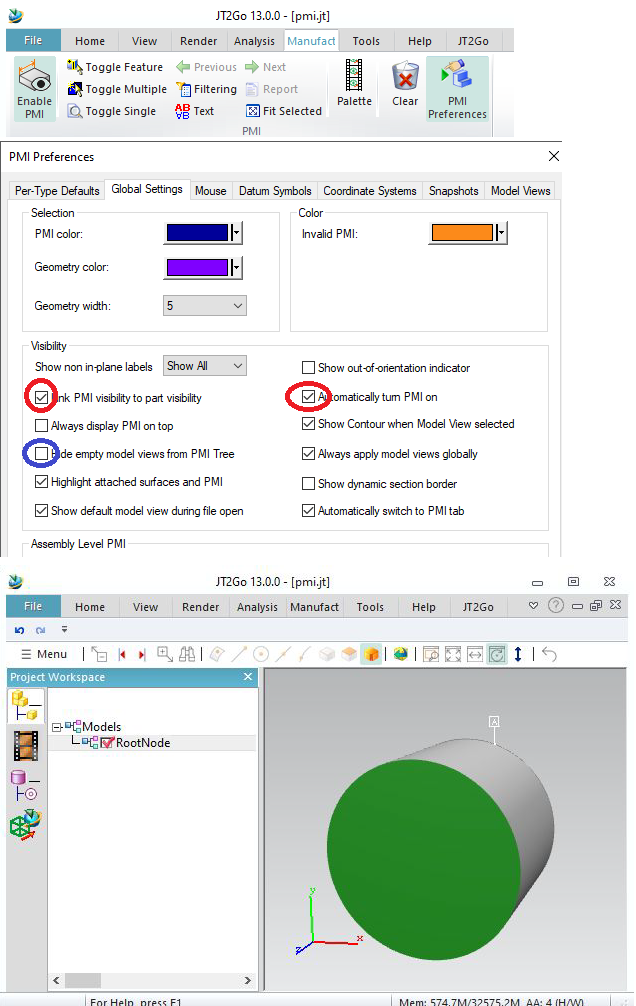
For this first example, the PMI is disconnected. Jt2Go won’t show it by defaut. Let’s configure it to show the PMI. Later, we can undo these modifications :
Go to PMI preference and make Jt2Go automatically turns on PMI. Do not hide empty modelview.
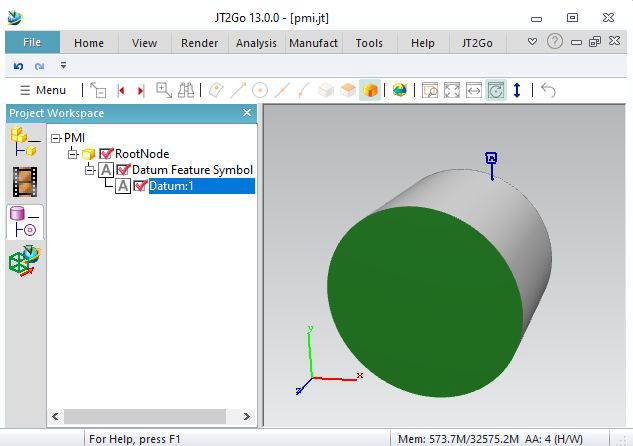
If you right click on the PMI and select « show in PMI tree », you will see the PMI type (a Datum Feature Symbol), and its name : « Datum:1 »

ModelViews (5.2)

Datakit Jt Writer allows to write modelviews.

//start_of_jtwsample52
{
Dtk_ErrorStatus errorStatus;
Dtk_Jtw_Interface jtWriter(inOutputFileName, errorStatus, Dtk_Jtw_Interface::xtbrep); // Specify allowing BREP Writing
CHECK_OK(errorStatus);
CHECK_OK(jtWriter.OpenInstance("RootNode")); // Rootnode creation
Dtk_BodyPtr cylinder = sampleWriter::CreateCyl(100, 150); // Create a Cylinder radius=100, height=150 (with a green face)
CHECK_OK(jtWriter.AddBody(cylinder)); // Add the body
Dtk_FdtPtr pmi = sampleWriter::CreateFdtDatum(); // Create an FDT (PMI)
CHECK_OK(jtWriter.AddPMI(pmi)); // Add the PMI
Dtk_pnt from(0, 0, 100);
Dtk_pnt to(0, 0, 0);
Dtk_dir up(0, 1, 0);
Dtk_CameraPtr cam = Dtk_Camera::Create(from, to, 100, 100, up); // semiwidth = 100
mvfit->info() = Dtk_Info::Create();
mvfit->info()->SetName("FitView");
CHECK_OK(jtWriter.AddModelView(mvfit));
from = Dtk_pnt(300, 300, 300);
up = Dtk_dir(-0.57735, 0.57735, -0.57735);
cam = Dtk_Camera::Create(from, to, 250, 250, up);
mv2->info() = Dtk_Info::Create();
mv2->info()->SetName("SecondView");
CHECK_OK(jtWriter.AddModelView(mv2));
CHECK_OK(jtWriter.CloseLastInstance()); // Rootnode closing.
std::cout << "=> " << inOutputFileName.c_str() << std::endl;
return dtkNoError;// Automatic Finish while J released
}
//end_of_jtwsample52

To define a Modelview, we need to define a camera.
Datakit JT Writer writes orthographic views.
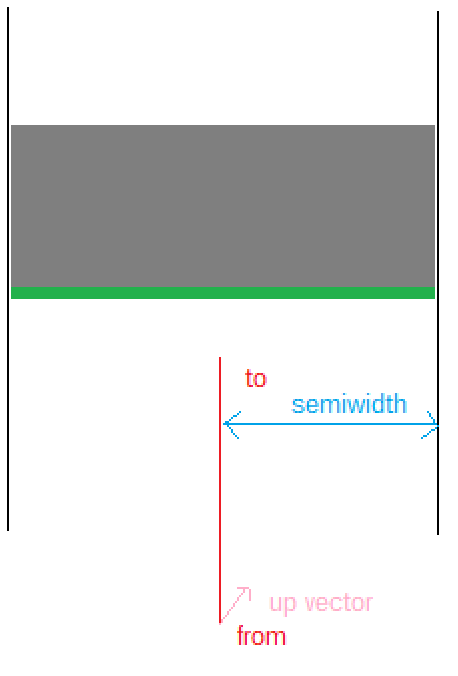
So we need a point from, a point to, an up vector, and also a semiwidth. It it the distance between the targetpoint and the bound of screen.
In our example, the cylinder has a radius of 100, so the semiwidth is 100, we transmit it in Camera construction for « FitView ».
As we see, we also fill Modelview names in info field.
(We suggest to write version 9.5 for better result).
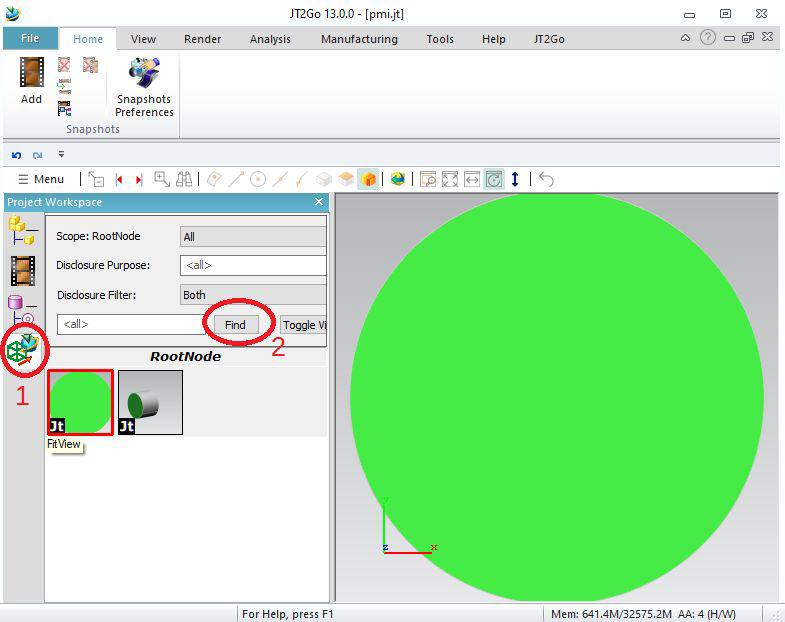
Here is the result in Jt2Go.
To see Modelviews, click on Modelviews on the left, then « find » to compute modelviews.
Selecting a modelview will set the camera.
You can see the name of the modelview when highlighting the view.
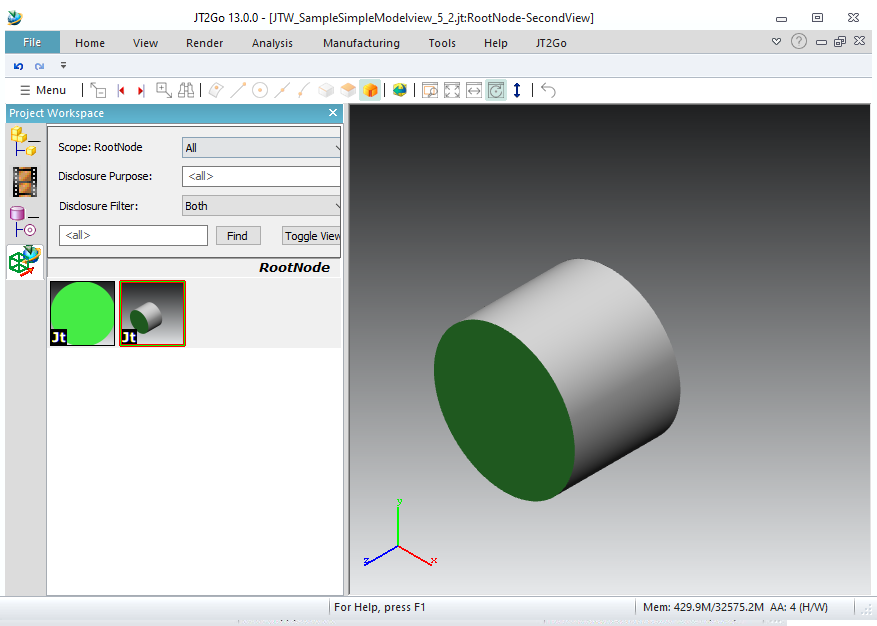
As you see, the PMI is not present in the modelview. We will have to associate it.


PMI and modelview association (5.3)

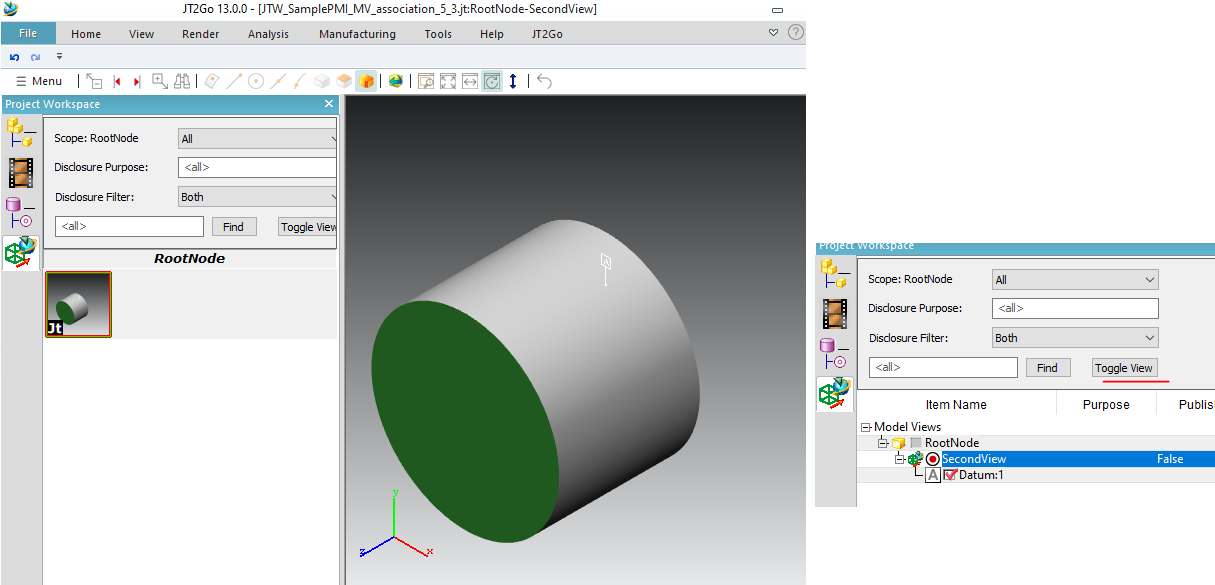
To insert a PMI into the modelview, you have to give an ID to the PMI (here we give for example ID 5), an ID to the PMI (here for example ID 8), and use ConnectPMI_ModelViews.
//start_of_jtwsample53
{
Dtk_ErrorStatus errorStatus;
Dtk_Jtw_Interface jtWriter(inOutputFileName, errorStatus, Dtk_Jtw_Interface::xtbrep); // Specify allowing BREP Writing
CHECK_OK(errorStatus);
CHECK_OK(jtWriter.OpenInstance("RootNode")); // Rootnode creation
Dtk_BodyPtr cylinder = sampleWriter::CreateCyl(100, 150); // Create a Cylinder radius=100, height=150 (with a green face)
CHECK_OK(jtWriter.AddBody(cylinder)); // Add the body
Dtk_FdtPtr pmi = sampleWriter::CreateFdtDatum(); // Create an FDT (PMI)
CHECK_OK(jtWriter.AddPMI(pmi, 5)); // Add the PMI, set ID = 5
Dtk_pnt from(300, 300, 300);
Dtk_pnt to(0, 0, 0);
Dtk_dir up(-0.57735, 0.57735, -0.57735);
Dtk_CameraPtr cam = Dtk_Camera::Create(from, to, 250, 250, up);
mv2->info() = Dtk_Info::Create();
mv2->info()->SetName("SecondView");
CHECK_OK(jtWriter.AddModelView(mv2, 8)); // Add Modelview, set ID = 8
CHECK_OK(jtWriter.ConnectPMI_ModelView(5, 8)); // Connect PMI 5 into Modelview 8
CHECK_OK(jtWriter.CloseLastInstance()); // Rootnode closing.
std::cout << "=> " << inOutputFileName.c_str() << std::endl;
return dtkNoError;// Automatic Finish while J released
}
//end_of_jtwsample53

Selecting « toggle view » will show which PMI are in which views.


PMI and geometry association (5.4)

We can associate a PMI to geometry (face, edge or vertex)

//start_of_jtwsample54
{
Dtk_ErrorStatus errorStatus;
Dtk_Jtw_Interface jtWriter(inOutputFileName, errorStatus, Dtk_Jtw_Interface::xtbrep); // Specify allowing BREP Writing
CHECK_OK(errorStatus);
CHECK_OK(jtWriter.OpenInstance("RootNode")); // Rootnode creation
Dtk_BodyPtr cylinder = sampleWriter::CreateCyl(100, 150); // Create a Cylinder radius=100, height=150 (with a green face)
CHECK_OK(jtWriter.AddBody(cylinder)); // Add the body
Dtk_FdtPtr pmi = sampleWriter::CreateFdtDatum(); // Create an FDT (PMI)
CHECK_OK(jtWriter.AddPMI(pmi, 5)); // Add the PMI, set ID = 5
Dtk_pnt from(300, 300, 300);
Dtk_pnt to(0, 0, 0);
Dtk_dir up(-0.57735, 0.57735, -0.57735);
Dtk_CameraPtr cam = Dtk_Camera::Create(from, to, 150, 150, up);
mv2->info() = Dtk_Info::Create();
mv2->info()->SetName("SecondView");
CHECK_OK(jtWriter.AddModelView(mv2, 8)); // Add Modelview, set ID = 8
CHECK_OK(jtWriter.ConnectPMI_ModelView(5, 8)); // Connect PMI 5 into Modelview 8
CHECK_OK(jtWriter.ConnectPMI_Geom(5, 2, DTK_TYPE_FACE)); // Connect PMI 5 on body, on face ID= 2
CHECK_OK(jtWriter.ConnectPMI_Geom(5, 15, DTK_TYPE_EDGE)); // Connect PMI 5 on body, on edge ID= 15
CHECK_OK(jtWriter.CloseLastInstance()); // Rootnode closing.
std::cout << "=> " << inOutputFileName.c_str() << std::endl;
return dtkNoError;// Automatic Finish while J released
}
//end_of_jtwsample54

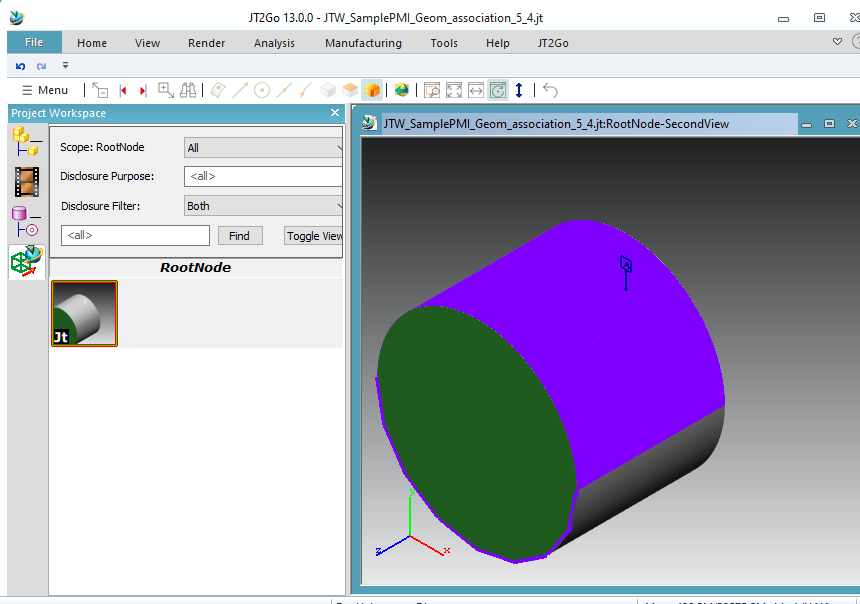
The body cylinder has face ID from 1 to 4, and edge ID from 11 to 16.
Here we associate the PMI 5 to face number 2, and edge number 15.
Clicking on PMI will highlight the face and the edge in JT2Go.

Sections (5.5)

It is also possible to write sections, giving second parameter of Dtk_ModelDisplay constructor.

//start_of_jtwsample55
{
body->AddOpenShell(shell);
section1->info() = Dtk_Info::Create();
section1->info()->SetColor(Dtk_RGB(128, 0, 0)); // red
shell->AddFace(face1, DTK_TRUE);
section2->info() = Dtk_Info::Create();
section2->info()->SetColor(Dtk_RGB(0, 0, 128)); // blue
shell->AddFace(face2, DTK_TRUE);
}
{
Dtk_ErrorStatus errorStatus;
Dtk_Jtw_Interface jtWriter(inOutputFileName, errorStatus, Dtk_Jtw_Interface::xtbrep); // Specify allowing BREP Writing
CHECK_OK(errorStatus);
CHECK_OK(jtWriter.OpenInstance("RootNode")); // Rootnode creation
Dtk_BodyPtr cylinder = sampleWriter::CreateCyl(100, 150); // Create a Cylinder radius=100, height=150 (with a green face)
CHECK_OK(jtWriter.AddBody(cylinder)); // Add the body
Dtk_FdtPtr pmi = sampleWriter::CreateFdtDatum(); // Create an FDT (PMI)
CHECK_OK(jtWriter.AddPMI(pmi, 5)); // Add the PMI, set ID = 5
Dtk_pnt from(300, 300, 300);
Dtk_pnt to(0, 0, 0);
Dtk_dir up(-0.57735, 0.57735, -0.57735);
Dtk_CameraPtr cam = Dtk_Camera::Create(from, to, 150, 150, up);
Dtk_PlaneSurfacePtr section = Dtk_PlaneSurface::Create(Dtk_pnt(), Dtk_dir(1, 0, 0), Dtk_dir(0, 1, 0)); // (A)
//Dtk_EntityPtr section = MakeMultiSection(); // (B)
mv2->info() = Dtk_Info::Create();
mv2->info()->SetName("SecondView");
CHECK_OK(jtWriter.AddModelView(mv2, 8)); // Add Modelview, set ID = 8
CHECK_OK(jtWriter.ConnectPMI_ModelView(5, 8)); // Connect PMI 5 into Modelview 8
CHECK_OK(jtWriter.ConnectPMI_Geom(5, 2, DTK_TYPE_FACE)); // Connect PMI 5 on body, on face ID= 2
CHECK_OK(jtWriter.ConnectPMI_Geom(5, 15, DTK_TYPE_EDGE)); // Connect PMI 5 on body, on edge ID= 15
CHECK_OK(jtWriter.CloseLastInstance()); // Rootnode closing.
std::cout << "=> " << inOutputFileName.c_str() << std::endl;
return dtkNoError;// Automatic Finish while J released
}
//end_of_jtwsample55

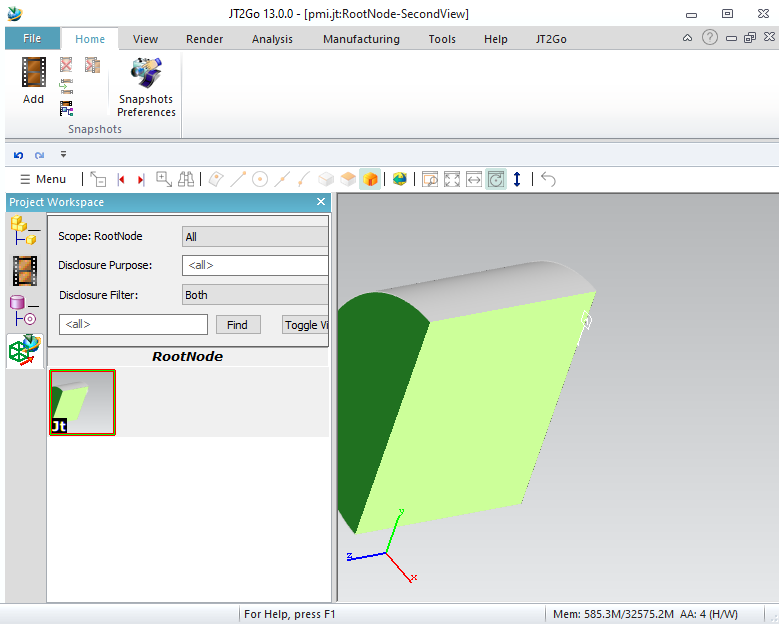
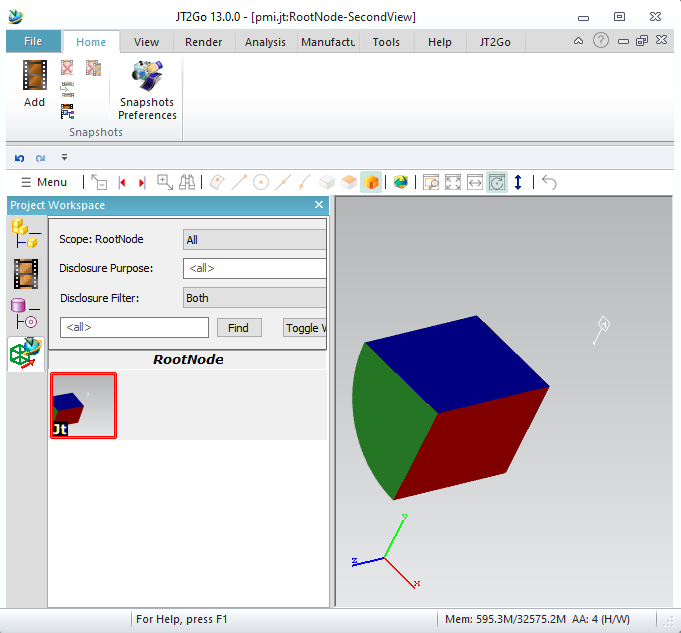
Here we give just a plane, and the section cuts the model in this modeldisplay. Default cutting color is yellow/green
It is also possible to make multiple sections. You need to fill a body to give to Dtk_ModelDisplay constructor.
In this function, we fill a Dtk_Entity as Body, containing 2 planes. These planes are colored (red and blue) to give section colors.
Enable MakeMultiSection function in this code (B) (disable (A)) to see this result :

PMI associations with other PMI (5.6)

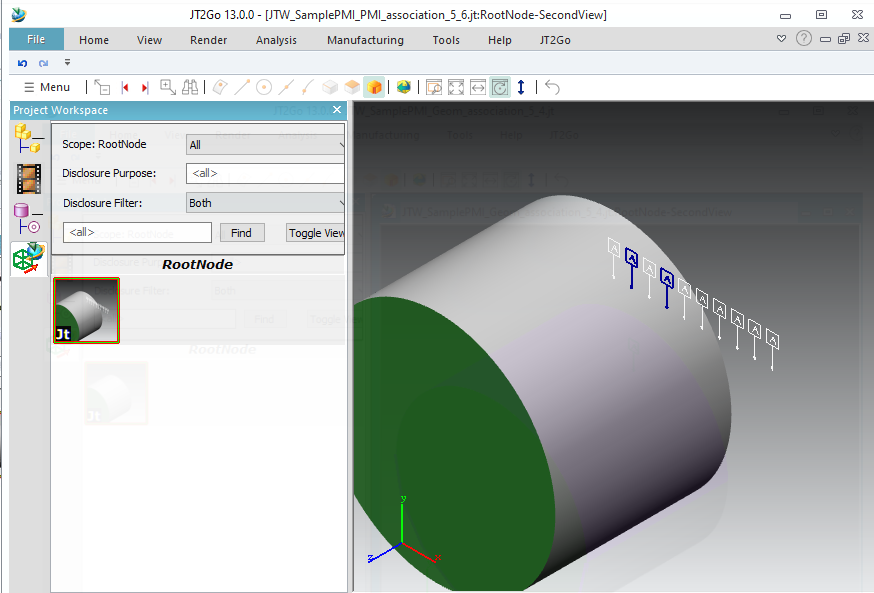
It is possible to link some PMI together. Here we create 10 PMI (ID 5 to 14) and we connect PMI 6 to PMI 8 with function ConnectPMI_PMI.
(Note that I changed Modelview ID to 30, to not collide with a PMI ID)

//start_of_jtwsample56
{
Dtk_ErrorStatus errorStatus;
Dtk_Jtw_Interface jtWriter(inOutputFileName, errorStatus, Dtk_Jtw_Interface::xtbrep); // Specify allowing BREP Writing
CHECK_OK(errorStatus);
CHECK_OK(jtWriter.OpenInstance("RootNode")); // Rootnode creation
Dtk_BodyPtr cylinder = sampleWriter::CreateCyl(100, 150); // Create a Cylinder radius=100, height=150 (with a green face)
CHECK_OK(jtWriter.AddBody(cylinder)); // Add the body
int pmiIdx;
for (pmiIdx = 0; pmiIdx < 10; pmiIdx++) // create 10 PMI
{
Dtk_FdtPtr pmi = sampleWriter::CreateFdtDatum(); // Create an FDT (PMI)
if( pmi.IsNotNULL() && pmi->Sub2DEntity().IsNotNULL() && pmi->Sub2DEntity()->get_type_detk() == DTK_TYPE_SYMBOL)
{ // changing letter inside PMI (datum feature symbol), or JT2Go recognize as same PMI with semantic informations, and example fails.
Dtk_SymbolPtr symb = Dtk_SymbolPtr::DtkDynamicCast( pmi->Sub2DEntity() );
if (symb.IsNotNULL() && symb->Texts().GetNumTexts() > 0 && symb->Texts()[0].Text().len()>0)
symb->Texts()[ 0 ].Text()[ 0 ] = (wchar_t)('A' + pmiIdx);
}
Shift(pmi, 15 * pmiIdx);
CHECK_OK(jtWriter.AddPMI(pmi, 5 + pmiIdx)); // Add the PMI, set ID = 5
}
Dtk_pnt from(300, 300, 300);
Dtk_pnt to(0, 0, 0);
Dtk_dir up(-0.57735, 0.57735, -0.57735);
Dtk_CameraPtr cam = Dtk_Camera::Create(from, to, 150, 150, up);
mv2->info() = Dtk_Info::Create();
mv2->info()->SetName("SecondView");
CHECK_OK(jtWriter.AddModelView(mv2, 30)); // Add Modelview, set ID = 8
for (pmiIdx = 0; pmiIdx < 10; pmiIdx++) // link the 10 PMIto ModelView
{
CHECK_OK(jtWriter.ConnectPMI_ModelView(5 + pmiIdx, 30));
}
CHECK_OK(jtWriter.ConnectPMI_PMI(6, 8)); // Associate PMI 6 to PMI 8
CHECK_OK(jtWriter.CloseLastInstance()); // Rootnode closing.
std::cout << "=> " << inOutputFileName.c_str() << std::endl;
return dtkNoError;// Automatic Finish while J released
}
//end_of_jtwsample56

Selecting this PMI will automaticly select the other.

Axis Systems, reference planes, axis, points (5.7)

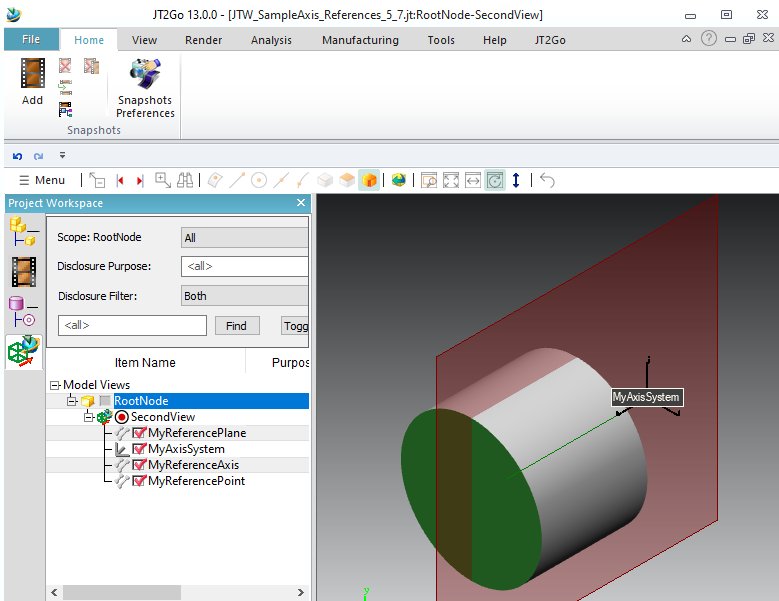
It is possible to write Axis Systems, reference planes, reference axis and reference points.
//start_of_jtwsample57
{
body->info() = Dtk_Info::Create();
body->info()->SetName("MyReferencePlane");
body->info()->SetInfiniteGeometryFlag(1); // mandatory
body->info()->SetColor(Dtk_RGB(128, 0, 0)); // color red
body->AddOpenShell(shell);
double box[4] = { -200,200,-200,200 }; // trim of the plane
plane->SetTrimUVBox(box);
shell->AddFace(face1, DTK_TRUE);
return body;
}
{
body->info() = Dtk_Info::Create();
body->info()->SetName("MyReferenceAxis");
body->info()->SetInfiniteGeometryFlag(1); // mandatory
body->info()->SetColor(Dtk_RGB(0, 128, 0)); // color green
body->AddOpenShell(shell);
Dtk_LinePtr L = Dtk_Line::Create(Dtk_pnt(100, 100, 0), Dtk_dir(0, 0, 1));
L->SetTrimmingParameters(0.0, 200.0);
shell->AddWire(tabwire);
return body;
}
{
body->info() = Dtk_Info::Create();
body->info()->SetName("MyReferencePoint");
body->info()->SetInfiniteGeometryFlag(1); // mandatory
body->info()->SetColor(Dtk_RGB(0, 0, 128)); // color blue
body->AddOpenShell(shell);
Dtk_PointPtr point = Dtk_Point::Create(Dtk_pnt(120, 120, 0));
tabpoints.push_back(point);
shell->AddWire(tabpoints);
return body;
}
{
Dtk_ErrorStatus errorStatus;
Dtk_Jtw_Interface jtWriter(inOutputFileName, errorStatus, Dtk_Jtw_Interface::xtbrep); // Specify allowing BREP Writing
CHECK_OK(errorStatus);
CHECK_OK(jtWriter.OpenInstance("RootNode")); // Rootnode creation
Dtk_BodyPtr cylinder = sampleWriter::CreateCyl(100, 150); // Create a Cylinder radius=100, height=150 (with a green face)
CHECK_OK(jtWriter.AddBody(cylinder)); // Add the body
Dtk_pnt from(300, 300, 300);
Dtk_pnt to(0, 0, 0);
Dtk_dir up(-0.57735, 0.57735, -0.57735);
Dtk_CameraPtr cam = Dtk_Camera::Create(from, to, 250, 250, up);
mv2->info() = Dtk_Info::Create();
mv2->info()->SetName("SecondView");
CHECK_OK(jtWriter.AddModelView(mv2, 8)); // Add Modelview, set ID = 8
axis->SetMatrix(Dtk_transfo(Dtk_dir(1, 0, 0), Dtk_dir(0, 1, 0), Dtk_dir(0, 0, 1), Dtk_pnt(100, 100, 0))); // X,Y,Z, O
axis->SetName("MyAxisSystem"); // give a name
CHECK_OK(jtWriter.AddAxisSystem(axis, 50)); // give ID 50
CHECK_OK(jtWriter.ConnectPMI_ModelView(50, 8)); // Connect AxisSystem 50 to Modelview 8
CHECK_OK(jtWriter.AddReferenceGeometry(refplane, 60)); // give ID 60
CHECK_OK(jtWriter.ConnectPMI_ModelView(60, 8)); // Connect Referenceplane 50 to Modelview 8
CHECK_OK(jtWriter.AddReferenceGeometry(refaxis, 70)); // give ID 70
CHECK_OK(jtWriter.ConnectPMI_ModelView(70, 8)); // Connect Referenceplane 60 to Modelview 8
CHECK_OK(jtWriter.AddReferenceGeometry(refpoint, 80)); // give ID 80
CHECK_OK(jtWriter.ConnectPMI_ModelView(80, 8)); // Connect Referenceplane 70 to Modelview 8
CHECK_OK(jtWriter.CloseLastInstance()); // Rootnode closing.
std::cout << "=> " << inOutputFileName.c_str() << std::endl;
return dtkNoError;// Automatic Finish while J released
}
//end_of_jtwsample57

Targeting a specific body (5.8)

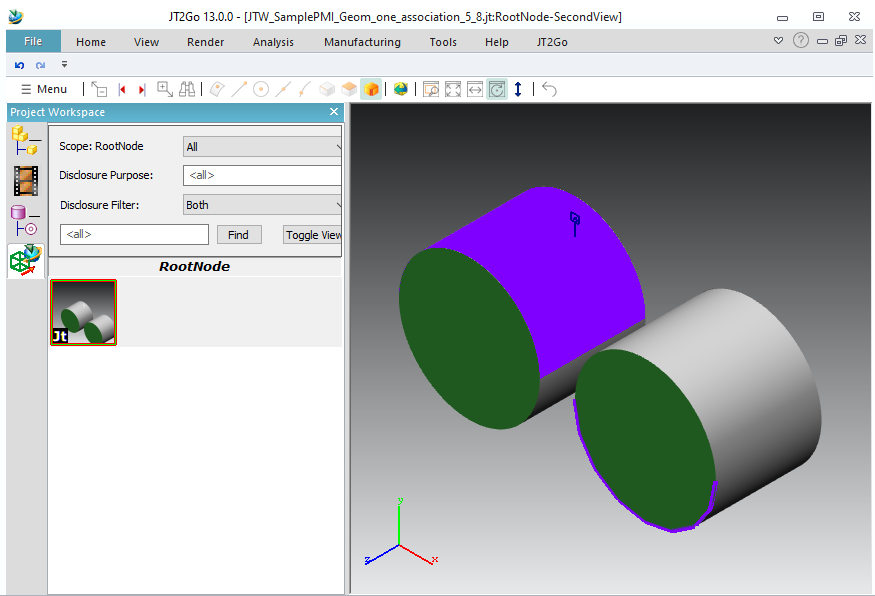
If you add more than one body in a single node, and want to connect a PMI on a specific body, you need another parameter. This example sets Id 10 and 11 to cylinders. Then the ConnectPMI_Geom sets the last parameter, to target face 2 in body 10, and also edge 15 on body 11.
//start_of_jtwsample58
{
Dtk_ErrorStatus errorStatus;
Dtk_Jtw_Interface jtWriter(inOutputFileName, errorStatus, Dtk_Jtw_Interface::xtbrep); // Specify allowing BREP Writing
CHECK_OK(errorStatus);
CHECK_OK(jtWriter.OpenInstance("RootNode")); // Rootnode creation
Dtk_BodyPtr cylinder = sampleWriter::CreateCyl(100, 150); // Create a Cylinder radius=100, height=150 (with a green face)
cylinder->info()->SetId(10);
CHECK_OK(jtWriter.AddBody(cylinder)); // Add the body
Dtk_BodyPtr cylinder2 = sampleWriter::CreateCyl(100, 150); // Create a Cylinder radius=100, height=150 (with a green face)
Shift(cylinder2, 250);
cylinder2->info()->SetId(11);
CHECK_OK(jtWriter.AddBody(cylinder2)); // Add the body
Dtk_FdtPtr pmi = sampleWriter::CreateFdtDatum(); // Create an FDT (PMI)
CHECK_OK(jtWriter.AddPMI(pmi, 5)); // Add the PMI, set ID = 5
Dtk_pnt from(300, 300, 300);
Dtk_pnt to(0, 0, 0);
Dtk_dir up(-0.57735, 0.57735, -0.57735);
Dtk_CameraPtr cam = Dtk_Camera::Create(from, to, 250, 250, up);
mv2->info() = Dtk_Info::Create();
mv2->info()->SetName("SecondView");
CHECK_OK(jtWriter.AddModelView(mv2, 8)); // Add Modelview, set ID = 8
CHECK_OK(jtWriter.ConnectPMI_ModelView(5, 8)); // Connect PMI 5 into Modelview 8
CHECK_OK(jtWriter.ConnectPMI_Geom(5, 2, DTK_TYPE_FACE, Dtk_tab<Dtk_Int64>(), 10)); // Connect PMI 5 on body 10, on face ID= 2
CHECK_OK(jtWriter.ConnectPMI_Geom(5, 15, DTK_TYPE_EDGE, Dtk_tab<Dtk_Int64>(), 11)); // Connect PMI 5 on body 11, on edge ID= 15
CHECK_OK(jtWriter.CloseLastInstance()); // Rootnode closing.
std::cout << "=> " << inOutputFileName.c_str() << std::endl;
return dtkNoError;// Automatic Finish while J released
}
//end_of_jtwsample58

Types of PMI (5.9)

A lot of types of PMI are supported. It is written as wireframe.
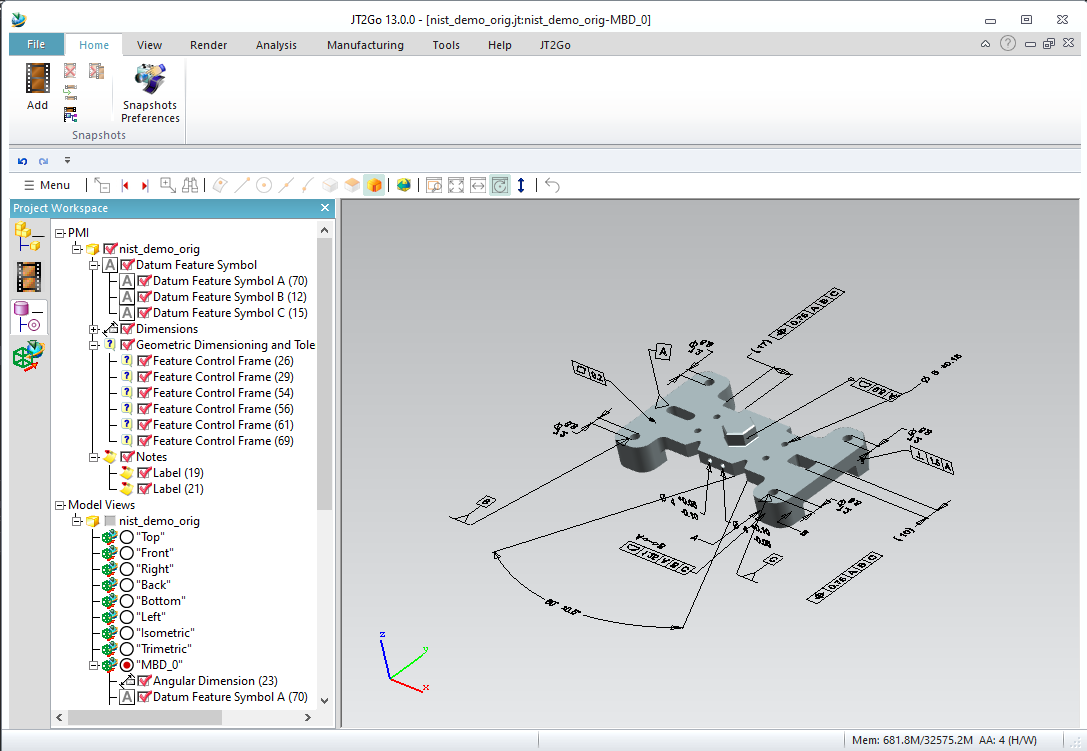

Assembly and PMI


Modelviews on assembly (6.1)

You can make modelviews in each node you want, by default the modelviews target all subassembly where the modelview is added.

//start_of_jtwsample61
{
Dtk_pnt from(300, 300, 300);
Dtk_pnt to(0, 0, 0);
Dtk_dir up(-0.57735, 0.57735, -0.57735);
Dtk_CameraPtr cam = Dtk_Camera::Create(from, to, 5, 5, up);
mv->info() = Dtk_Info::Create();
mv->info()->SetName(inName);
return mv;
}
{
Dtk_dir X(1, 0, 0);
Dtk_dir Y(0, 1, 0);
Dtk_dir Z(0, 0, 1);
Dtk_ErrorStatus errorStatus;
Dtk_Jtw_Interface jtWriter(inOutputFileName, errorStatus, Dtk_Jtw_Interface::xtbrep); // Specify allowing BREP Writing
CHECK_OK(errorStatus);
CHECK_OK(jtWriter.OpenInstance("RootNode")); // Rootnode creation
Dtk_Int64 id_of_axles = 2;
CHECK_OK(jtWriter.OpenInstance("Axles", id_of_axles)); // open Axles, give an ID for future reinstance, placement by default : identity matrix
CHECK_OK(jtWriter.OpenInstance("Axle")); // open
CHECK_OK(jtWriter.AddBody(axle));
CHECK_OK(jtWriter.AddModelView(CreateModelDisplay("AxleMV"), 8));
CHECK_OK(jtWriter.CloseLastInstance()); // close Axle
CHECK_OK(jtWriter.OpenInstance("Wheels")); // open
Dtk_Int64 id_of_wheel = 1;
CHECK_OK(jtWriter.OpenInstance("Wheel", id_of_wheel, Dtk_transfo(X, Y, Z, Dtk_pnt(0, 0, 5)))); // open instance
CHECK_OK(jtWriter.AddBody(wheel));
CHECK_OK(jtWriter.AddModelView(CreateModelDisplay("WheelMV"), 8));
CHECK_OK(jtWriter.CloseLastInstance()); // close Wheel
CHECK_OK(jtWriter.OpenInstance("Wheel2", id_of_wheel, Dtk_transfo(X, -Y, -Z, Dtk_pnt()))); // open reinstance
CHECK_OK(jtWriter.CloseLastInstance()); // reinstancied : must close Wheel immediatly.
CHECK_OK(jtWriter.CloseLastInstance()); // close Wheels
CHECK_OK(jtWriter.CloseLastInstance()); // close Axles
CHECK_OK(jtWriter.OpenInstance("Axles2", id_of_axles, Dtk_transfo(X, Y, Z, Dtk_pnt(5, 0, 0)))); // reinstance whole subassembly with matrix
CHECK_OK(jtWriter.CloseLastInstance()); // close Axles2
CHECK_OK(jtWriter.AddModelView(CreateModelDisplay("RootMV"), 8));
CHECK_OK(jtWriter.CloseLastInstance()); // Rootnode closing.
std::cout << "=> " << inOutputFileName.c_str() << std::endl;
return dtkNoError;// Automatic Finish while J released
}
//end_of_jtwsample61

Note that for this example, modelviews are empty, you need to tell Jt2Go to show empty modelviews (see 5.1.)
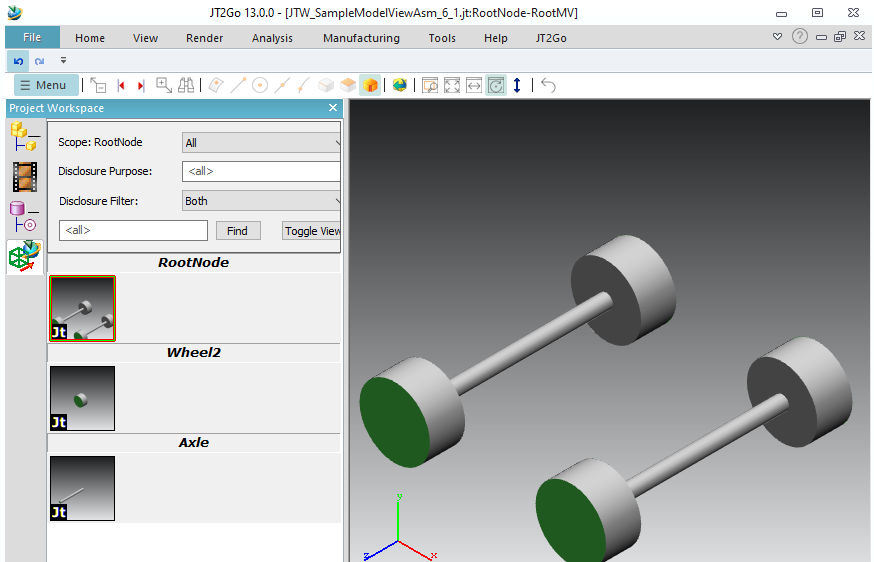

Targeting a specific instance (6.2)

Before targeting a specific instance, we need to give ID to each node :
Let's see this code :

//start_of_jtwsample62
Dtk_tab<Dtk_Int64> Makeroute(Dtk_Int64 inRouteIds[], int inCount)
{
for (int routeIdx = 0; routeIdx < inCount; routeIdx++)
res.push_back(inRouteIds[routeIdx]);
return res;
}
{
double scale = 0.1;
Dtk_transfo rescale(Dtk_dir(scale, 0, 0), Dtk_dir(0, scale, 0), Dtk_dir(0, 0, scale), scale * Dtk_pnt(-50., -100., -50.));
pmi->Transform(rescale);
Dtk_transfo shift;
shift.addTranslate(inPosition);
pmi->Transform(shift);
return pmi;
}
Dtk_ErrorStatus MakePmiOnRoot(Dtk_Jtw_Interface& inoutJtWriter, int inOption)
{
Dtk_pnt from(300, 300, 300);
Dtk_pnt to(3, 0, 3);
Dtk_dir up(-0.57735, 0.57735, -0.57735);
Dtk_CameraPtr cam = Dtk_Camera::Create(from, to, 5, 5, up);
mv2->info() = Dtk_Info::Create();
mv2->info()->SetName("View");
CHECK_OK(inoutJtWriter.AddModelView(mv2, 8)); // Add Modelview, set ID = 8
if (inOption == 1) // 6.2. Add instances by addition
{
Dtk_Int64 r1[] = { 1,11,2,13,4,14 }; // target one specific wheel
Dtk_Int64 r2[] = { 1,16 }; // target one specific axle subassembly
CHECK_OK(inoutJtWriter.ConnectModelView_Instance(8, Makeroute(r1, 6)));
CHECK_OK(inoutJtWriter.ConnectModelView_Instance(8, Makeroute(r2, 2)));
}
if (inOption == 2) // 6.3. Remove instances (subtraction)
{
Dtk_Int64 r1[] = { 1,11,2,13,4,14 }; // target one specific wheel
CHECK_OK(inoutJtWriter.ConnectModelView_Instance(8, Makeroute(r1, 6), 1)); // last parameter hide = 1
}
if (inOption == 3) // 6.4. Target PMI on assembly geometry
{
CHECK_OK(inoutJtWriter.AddPMI(pmi, 5)); // Add the PMI, set ID = 5
CHECK_OK(inoutJtWriter.ConnectPMI_ModelView(5, 8)); // set PMI into Modelview
Dtk_Int64 r1[] = { 1,11,2,13,4,15,5 }; // target one specific wheel
CHECK_OK(inoutJtWriter.ConnectPMI_Geom(5, 3, DTK_TYPE_FACE, Makeroute(r1, 7)));
Dtk_Int64 r2[] = { 1,16,2,12, 3 }; // target one specific axle
CHECK_OK(inoutJtWriter.ConnectPMI_Geom(5, 2, DTK_TYPE_FACE, Makeroute(r2, 5)));
}
if( inOption == 4 ) // 6.2. Add instances by addition, and shift for exploded view
{
Dtk_Int64 rsub[] = { 1,16 }; // target one specific axle subassembly
Dtk_Int64 rw1[] = { 1,11,2,13,4,14 }; // target the first wheel of the other axle subassembly
Dtk_Int64 rw2[] = { 1,11,2,13,4,15 }; // target the second wheel of the other axle subassembly
Dtk_Int64 ra[] = { 1,11,2,12 }; // target the axle of the other axle subassembly
Dtk_dir X( 1, 0, 0 );
Dtk_dir Y( 0, 1, 0 );
Dtk_dir Z( 0, 0, 1 );
Dtk_transfo newplacementwheel1( X, Y, Z, Dtk_pnt( 0, 0, 8 ) );
Dtk_transfo newplacementwheel2( X, -Y, -Z, Dtk_pnt( 0, 0, -3 ) );
CHECK_OK( inoutJtWriter.ConnectModelView_Instance( 8, Makeroute( rsub, 2 ) ) );
CHECK_OK( inoutJtWriter.ConnectModelView_Instance( 8, Makeroute( ra, 4 ) ) );
CHECK_OK( inoutJtWriter.ConnectModelView_Instance( 8, Makeroute( rw1, 6 ), 0, 0, &newplacementwheel1 ) );
CHECK_OK( inoutJtWriter.ConnectModelView_Instance( 8, Makeroute( rw2, 6 ), 0, 0, &newplacementwheel2 ) );
}
return dtkNoError;
}
Dtk_ErrorStatus JtwSampleModelViewTarget_6_2(const Dtk_string& inOutputFileName, int inOption)
{
Dtk_dir X(1, 0, 0);
Dtk_dir Y(0, 1, 0);
Dtk_dir Z(0, 0, 1);
Dtk_ErrorStatus errorStatus;
Dtk_Jtw_Interface jtWriter(inOutputFileName, errorStatus, Dtk_Jtw_Interface::xtbrep); // Specify allowing BREP Writing
CHECK_OK(errorStatus);
CHECK_OK(jtWriter.OpenInstance("RootNode", 1)); // Rootnode creation
CHECK_OK(jtWriter.OpenInstance("Axles", 2));
CHECK_OK(jtWriter.LastInstance_SetInstanceID(11));
CHECK_OK(jtWriter.OpenInstance("Axle", 3));
CHECK_OK(jtWriter.LastInstance_SetInstanceID(12));
CHECK_OK(jtWriter.AddBody(axle));
CHECK_OK(jtWriter.CloseLastInstance()); // close Axle
CHECK_OK(jtWriter.OpenInstance("Wheels", 4));
CHECK_OK(jtWriter.LastInstance_SetInstanceID(13));
CHECK_OK(jtWriter.OpenInstance("Wheel", 5, Dtk_transfo(X, Y, Z, Dtk_pnt(0, 0, 5))));
CHECK_OK(jtWriter.LastInstance_SetInstanceID(14));
CHECK_OK(jtWriter.AddBody(wheel));
CHECK_OK(jtWriter.CloseLastInstance()); // close Wheel
CHECK_OK(jtWriter.OpenInstance("Wheel2", 5, Dtk_transfo(X, -Y, -Z, Dtk_pnt())));
CHECK_OK(jtWriter.LastInstance_SetInstanceID(15));
CHECK_OK(jtWriter.CloseLastInstance()); // reinstancied : must close Wheel2 immediatly.
CHECK_OK(jtWriter.CloseLastInstance()); // close Wheels
CHECK_OK(jtWriter.CloseLastInstance()); // close Axles
CHECK_OK(jtWriter.OpenInstance("Axles2", 2, Dtk_transfo(X, Y, Z, Dtk_pnt(6, 0, 0))));
CHECK_OK(jtWriter.LastInstance_SetInstanceID(16));
CHECK_OK(jtWriter.CloseLastInstance()); // close Axles2
MakePmiOnRoot(jtWriter, inOption);
CHECK_OK(jtWriter.CloseLastInstance()); // Rootnode closing.
std::cout << "=> " << inOutputFileName.c_str() << std::endl;
return dtkNoError;// Automatic Finish while J released
}
//end_of_jtwsample62

With this code, we give an ID to each node, into OpenInstance, we see ("Axles", 2), ("Axle", 3), ("Wheels", 4), ("Wheel", 5)
Some are re-instantiated (2 and 5)
It gives this tree inside Jt2Go
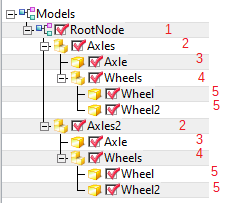
With this, we can target a node. But there are multiple nodes « 5 » and multiple nodes « 2 », because these nodes are re-instantiated.
To remove ambiguity, we can give ID to instances too, using LastInstance_SetInstanceID :
In this code, we define instancesid 11,12,13,14,15,16. (Avoid giving same id as idParts given by OpenInstance)
Now, the tree is :
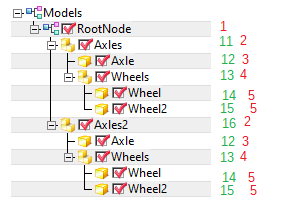
Now we can reach an instance, using a « route » to reach it :
To reach first wheel, route is 1,11,2,13,4,14,5
To reach second Axle, route is 1,16,2,12,3
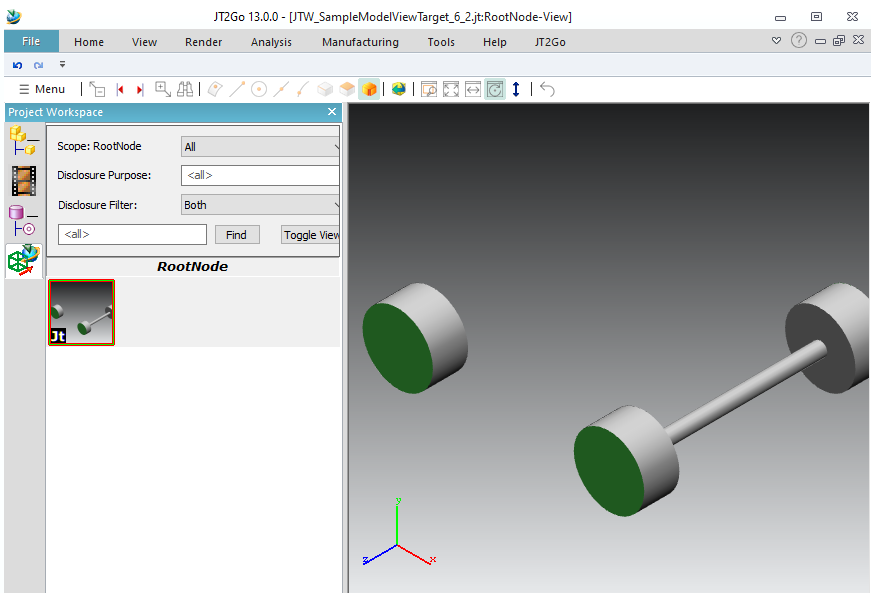
To reach last Wheels subassembly, route is 1,16,2,13,4
Now let’s fill function MakePmiOnRoot (with option 1 for this sample) to target only an axle, and just a wheel on the other axle :
Fill a « route » to target an assembly you need.

Removing a specific instance from Modelview (6.3)

The previous sample shows how to select subassemblies to put in modeldisplay.
We can select subassemblies to remove from modeldisplay
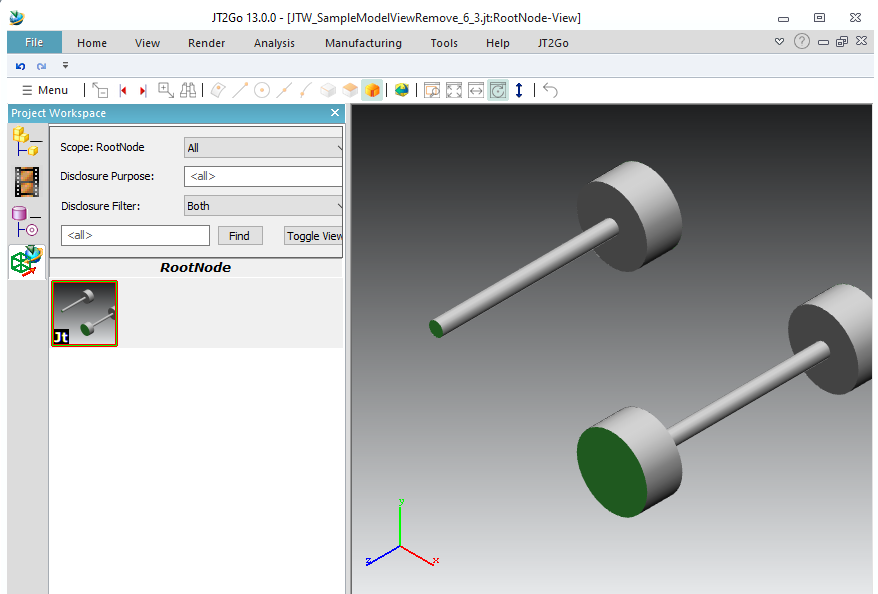
See previous code with option 2 for this sample.
We consider route 1,11,2,13,4,14 (to a specific wheel), then we use last parameter "hide" of ConnectModelView_Instance to hide it.
In the previous example we selected instances to add, now we keep all instances besides the selected one.

Targeting geometry in assembly (6.4)

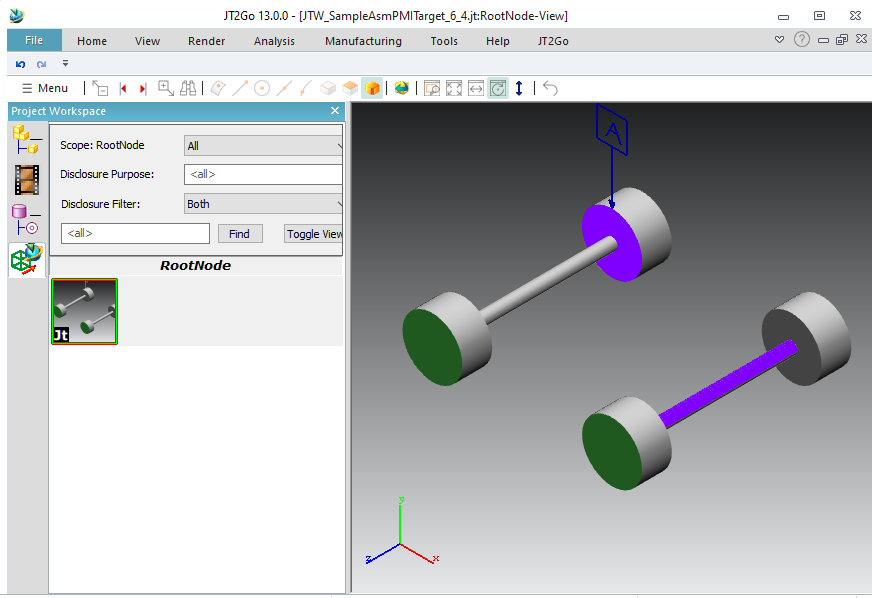
Let’s consider a PMI into root node, we want it to target a face of a specific geometry instance, and also another face somewhere else in assembly.
See previous code with option 3 for this sample.

Exploded views (6.5)

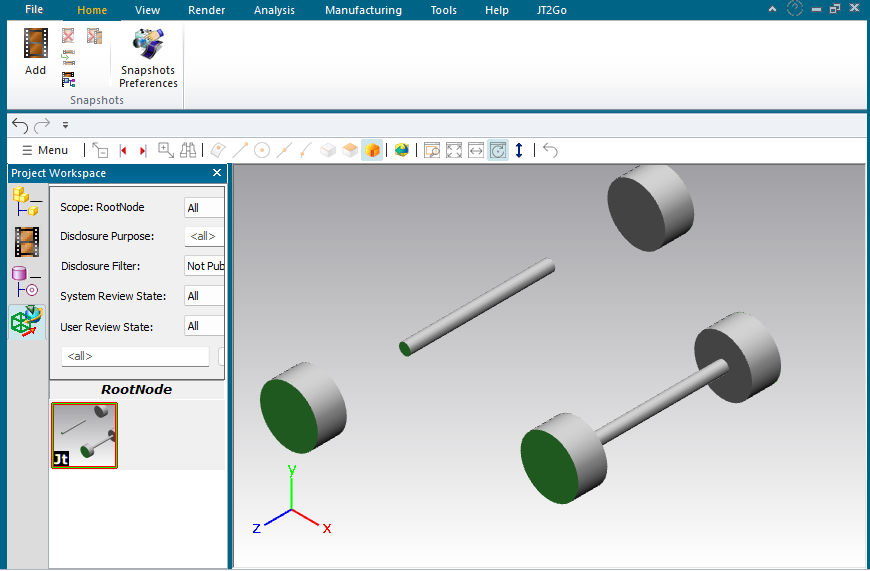
This sample shows how to make an exploded view
See previous code with option 4 for this sample.
We use the last parameter of ConnectModelView_Instance, a pointer on a Dtk_Transfo that override the position of each component, in world system coordinates. We need to connect to the modelview each instances, with a transformation matrix. We define the full route of each part (inluding instances). Only 2 wheels of this sample have their position redefined.

Dtk_Info::Create
static Dtk_SmartPtr< Dtk_Info > Create()
Calls default constructor to allocate a new object.
Dtk_ModelDisplay::Create
static Dtk_ModelDisplayPtr Create(const Dtk_CameraPtr &inCamera, const Dtk_EntityPtr &inClippingEntity, const Dtk_bool inIsActivated)
Calls full featured constructor to allocate a new object.
DTK_MESH_NORMAL
#define DTK_MESH_NORMAL
Definition: util_mesh_dtk.hpp:31
Dtk_ID
uint32_t Dtk_ID
Definition: define.h:688
Dtk_transfo
This is the Transformation dedicated class.
Definition: dtk_transfo.hpp:19
Dtk_mesh_face
This is a high level face class.
Definition: util_mesh_dtk.hpp:1076
DTK_TYPE_UNKNOWN
@ DTK_TYPE_UNKNOWN
Definition: define.h:26
CreateFdtDatumAt
Dtk_FdtPtr CreateFdtDatumAt(const Dtk_pnt &inPosition)
Definition: testlibjtwrite.cpp:1136
Dtk_TextureInfos::Create
static Dtk_TextureInfosPtr Create(const TextureMappingTypeEnum &inType)
Create a Dtk_TextureInfosPtr.
JtwSampleMetadatas_4_3
Dtk_ErrorStatus JtwSampleMetadatas_4_3(const Dtk_string &inOutputFileName)
Definition: testlibjtwrite.cpp:621
JtwSampleSimpleModelview_5_2
Dtk_ErrorStatus JtwSampleSimpleModelview_5_2(const Dtk_string &inOutputFileName)
Definition: testlibjtwrite.cpp:730
Dtk_PlaneSurface::Create
static Dtk_PlaneSurfacePtr Create(const Dtk_pnt &inOrigin, const Dtk_dir &inNormal, const Dtk_dir &inUDirection, const Dtk_dir &inVDirection=Dtk_dir())
Create an infinite plane surface.
JtwSamplePMI_Geom_association_5_4
Dtk_ErrorStatus JtwSamplePMI_Geom_association_5_4(const Dtk_string &inOutputFileName)
Definition: testlibjtwrite.cpp:798
DTK_PICTURE_RGB24
@ DTK_PICTURE_RGB24
Definition: dtk_picture.hpp:22
sampleWriter::CreateMeshCube
Dtk_MeshPtr CreateMeshCube()
Mesh Cube sample.
Definition: testcreatemesh.cpp:207
JtwSampleMultipleFilesShattered_3_7
Dtk_ErrorStatus JtwSampleMultipleFilesShattered_3_7(const Dtk_string &inOutputFileName)
Definition: testlibjtwrite.cpp:545
Dtk_SmartPtr::IsNotNULL
Dtk_bool IsNotNULL() const
Definition: util_ptr_dtk.hpp:119
Dtk_picture::PixelWidth
Dtk_Size_t & PixelWidth()
Retrieves the width (in pixels)
Definition: dtk_picture.hpp:85
sampleWriter::CreateCyl
Dtk_BodyPtr CreateCyl(double radius, double height)
Creates a BRep cylinder body with the given radius and height using analytical cylindrical and planar...
Definition: testcreatecube.cpp:1770
AllJtWTests
DtkErrorStatus AllJtWTests(const Dtk_string &inResultDirectory)
Definition: testlibjtwrite.cpp:1241
sampleWriter::CreateMeshCubeVertexColor
Dtk_MeshPtr CreateMeshCubeVertexColor()
Creates a unit cube mesh with per-vertex color data (red, green, blue, white cycling per face).
Definition: testcreatemesh.cpp:300
JtwSampleLayers_4_4
Dtk_ErrorStatus JtwSampleLayers_4_4(const Dtk_string &inOutputFileName)
Definition: testlibjtwrite.cpp:643
Dtk_LayerInfosSet::Layer
Definition: util_ent_dtk.hpp:512
CreateLayerInfosSet
Dtk_LayerInfosSetPtr CreateLayerInfosSet()
Definition: testlibjtwrite.cpp:671
sampleWriter::CreateMeshPoints
Dtk_MeshPtr CreateMeshPoints()
Points mesh sample.
Definition: testcreatemesh.cpp:440
tess_InitTesselation
int tess_InitTesselation(Dtk_string inWorkingDirectory, double inTolerance)
Init the tesselation library.
DTK_TRUE
#define DTK_TRUE
Definition: define.h:726
Dtk_mesh::Create
static Dtk_MeshPtr Create(int inVertex_format=1, Dtk_bool inBack_face_culling=true)
Constructor.
Dtk_Info::AddRenderInfos
Dtk_ErrorStatus AddRenderInfos(const Dtk_RenderInfosPtr &inRender)
Dtk_string
This is a high level string class.
Definition: dtk_string.hpp:53
Dtk_Jtw_Interface::keepsubcolor
@ keepsubcolor
Definition: jtw.h:30
JtwSampleModelViewAsm_6_1
Dtk_ErrorStatus JtwSampleModelViewAsm_6_1(const Dtk_string &inOutputFileName)
Definition: testlibjtwrite.cpp:1083
JtwSamplePartInstances_3_2
Dtk_ErrorStatus JtwSamplePartInstances_3_2(const Dtk_string &inOutputFileName)
Definition: testlibjtwrite.cpp:341
JtWriteSample
DtkErrorStatus JtWriteSample(const Dtk_string &inResultDirectory)
Definition: testlibjtwrite.cpp:1330
Dtk_RenderInfos::Create
static Dtk_RenderInfosPtr Create(const Dtk_string &inName)
Creates a Dtk_RenderInfosPtr.
JtwSampleVersion_4_1
Dtk_ErrorStatus JtwSampleVersion_4_1(const Dtk_string &inOutputFileName)
Definition: testlibjtwrite.cpp:589
Dtk_Jtw_Interface::ConnectPMI_Geom
Dtk_ErrorStatus ConnectPMI_Geom(Dtk_Int64 inIdfdt, Dtk_Int64 inGeomid, type_detk inTypegeom, const Dtk_tab< Dtk_Int64 > &inRoute=Dtk_tab< Dtk_Int64 >(), Dtk_ID inBodyID=0)
Connect a PMI on a body face/edge/vertex.
Dtk_Body::Create
static Dtk_BodyPtr Create()
Create a body.
DTK_MESH_XYZ
#define DTK_MESH_XYZ
Definition: util_mesh_dtk.hpp:30
Dtk_LightMap::Create
static Dtk_LightMapPtr Create(Dtk_RGB inAmbiant, Dtk_RGB inDiffuse, Dtk_RGB inSpecular)
Create a Dtk_LightMapPtr.
MakePmiOnRoot
Dtk_ErrorStatus MakePmiOnRoot(Dtk_Jtw_Interface &inoutJtWriter, int inOption)
Definition: testlibjtwrite.cpp:1148
DTK_TYPE_SYMBOL
@ DTK_TYPE_SYMBOL
Definition: define.h:400
Dtk_picture::MetricWidth
double & MetricWidth()
Retrieves the width (in mm)
Definition: dtk_picture.hpp:95
tess_ComputeBoundariesFromMesh
void tess_ComputeBoundariesFromMesh(int value)
Set boundaries computation from mesh option. Default value is enabled (1). See tess_getBoundariesFrom...
DTK_MESH_UV_TEXTURES
#define DTK_MESH_UV_TEXTURES
Definition: util_mesh_dtk.hpp:33
JtwSampleInstancesColors_3_4
Dtk_ErrorStatus JtwSampleInstancesColors_3_4(const Dtk_string &inOutputFileName)
Definition: testlibjtwrite.cpp:418
Dtk_Jtw_Interface::xtbrep
@ xtbrep
Definition: jtw.h:26
Dtk_picture::PixelHeight
Dtk_Size_t & PixelHeight()
Retrieves the height (in pixels)
Definition: dtk_picture.hpp:90
JtwSampleAssembly_3_1
Dtk_ErrorStatus JtwSampleAssembly_3_1(const Dtk_string &inOutputFileName)
Definition: testlibjtwrite.cpp:307
MakeReferenceAxis
Dtk_BodyPtr MakeReferenceAxis()
Definition: testlibjtwrite.cpp:954
JtwSampleMultipleFilesPerPart_3_6
Dtk_ErrorStatus JtwSampleMultipleFilesPerPart_3_6(const Dtk_string &inOutputFileName)
Definition: testlibjtwrite.cpp:502
Dtk_picture::FileType
Dtk_PictureType & FileType()
Retrieves the file type.
Definition: dtk_picture.hpp:81
Dtk_Face::Create
static Dtk_FacePtr Create(const Dtk_BodyPtr &inParentBody)
Create a face in a body.
CreateModelDisplay
Dtk_ModelDisplayPtr CreateModelDisplay(const Dtk_string &inName)
Definition: testlibjtwrite.cpp:1071
JtwSamplePMI_Geom_one_association_5_8
Dtk_ErrorStatus JtwSamplePMI_Geom_one_association_5_8(const Dtk_string &inOutputFileName)
Definition: testlibjtwrite.cpp:1031
JtwSampleTextures_1_3
Dtk_ErrorStatus JtwSampleTextures_1_3(const Dtk_string &inOutputFileName)
Definition: testlibjtwrite.cpp:127
Dtk_Jtw_Interface::version95
@ version95
Definition: jtw.h:41
JtwSampleWireBody_2_3
Dtk_ErrorStatus JtwSampleWireBody_2_3(const Dtk_string &inOutputFileName)
Definition: testlibjtwrite.cpp:184
sampleWriter::CreateMeshWire
Dtk_MeshPtr CreateMeshWire()
Wire mesh sample.
Definition: testcreatemesh.cpp:389
Dtk_picture::MetricHeight
double & MetricHeight()
Retrieves the height (in mm)
Definition: dtk_picture.hpp:99
JtwSampleOneMesh_1_1
Dtk_ErrorStatus JtwSampleOneMesh_1_1(const Dtk_string &inOutputFileName)
Definition: testlibjtwrite.cpp:21
Dtk_picture::File
Dtk_tab< char > & File()
Retrieves the binary file.
Definition: dtk_picture.hpp:77
Dtk_picture
This class defines a picture.
Definition: dtk_picture.hpp:39
Makeroute
Dtk_tab< Dtk_Int64 > Makeroute(Dtk_Int64 inRouteIds[], int inCount)
Definition: testlibjtwrite.cpp:1128
Dtk_Int64
int64_t Dtk_Int64
Definition: define.h:691
Dtk_AxisSystem::Create
static Dtk_SmartPtr< Dtk_AxisSystem > Create()
Calls default constructor to allocate a new object.
sampleWriter::CreateFdtDatum
Dtk_FdtPtr CreateFdtDatum()
Creates simple Datum.
Definition: testcreatefdt.cpp:14
Dtk_TextureInfos::StoredUVMapping
@ StoredUVMapping
Definition: dtk_render.hpp:35
JtwSampleModelview_sections_5_5
Dtk_ErrorStatus JtwSampleModelview_sections_5_5(const Dtk_string &inOutputFileName)
Definition: testlibjtwrite.cpp:852
Dtk_tab::resize
void resize(Dtk_Size_t n, const T &t)
Resizes the array.
Definition: util_stl_dtk.hpp:604
DTK_DOTTED
@ DTK_DOTTED
Definition: util_ent_dtk.hpp:57
DTK_TYPE_FACE
@ DTK_TYPE_FACE
Definition: define.h:132
JtwSamplePMI_PMI_association_5_6
Dtk_ErrorStatus JtwSamplePMI_PMI_association_5_6(const Dtk_string &inOutputFileName)
Definition: testlibjtwrite.cpp:889
Shift
void Shift(T &inoutMesh, double inShiftAmount)
Definition: testlibjtwrite.cpp:39
Dtk_MetaData::TypeProperty
@ TypeProperty
Definition: dtk_metadata.hpp:29
JtwSampleSimplePMI_5_1
Dtk_ErrorStatus JtwSampleSimplePMI_5_1(const Dtk_string &inOutputFileName)
Definition: testlibjtwrite.cpp:710
Dtk_SmartPtr< Dtk_Face >::DtkDynamicCast
static Dtk_SmartPtr< Dtk_Face > DtkDynamicCast(const Dtk_SmartPtr< T2 > &p)
Definition: util_ptr_dtk.hpp:101
Dtk_ErrorStatus
Dtk_ErrorStatus
Definition: error_dtk.hpp:6
Dtk_SmartPtr::IsNULL
Dtk_bool IsNULL() const
Definition: util_ptr_dtk.hpp:118
Dtk_Face::SetGeom
void SetGeom(const Dtk_SurfacePtr &inSurface)
Set Geometry.
Dtk_Jtw_Interface::AddPMI
Dtk_ErrorStatus AddPMI(const Dtk_FdtPtr &inPMI, Dtk_Int64 inIdpmi=-1)
Add a fdt into the current node.
CHECK_OK
#define CHECK_OK(X)
Definition: testwriters.h:8
JtwSampleMeshes_1_2
Dtk_ErrorStatus JtwSampleMeshes_1_2(const Dtk_string &inOutputFileName)
Definition: testlibjtwrite.cpp:46
Dtk_SmartPtr
Definition: util_ptr_dtk.hpp:37
Dtk_Jtw_Interface::inches
@ inches
Definition: jtw.h:59
Dtk_string::c_str
const char * c_str() const
Retrieve the ASCII conversion string.
Dtk_Jtw_Interface::version80
@ version80
Definition: jtw.h:35
CreateTextureMesh
Dtk_MeshPtr CreateTextureMesh()
Definition: testlibjtwrite.cpp:96
Dtk_Point::Create
static Dtk_PointPtr Create(const Dtk_Point &in)
Calls copy constructor to allocate a new object.
AddVertex
void AddVertex(Dtk_MeshPtr inoutMesh, const Dtk_pnt &inPosition, const Dtk_dir &inNormal, float inTexU, float inTexV)
Definition: testlibjtwrite.cpp:91
Dtk_pnt
This is a mathematical point class.
Definition: dtk_pnt.hpp:20
MakeReferencePlane
Dtk_BodyPtr MakeReferencePlane()
Definition: testlibjtwrite.cpp:936
JtwSampleLightmap_2_5
Dtk_ErrorStatus JtwSampleLightmap_2_5(const Dtk_string &inOutputFileName)
Definition: testlibjtwrite.cpp:250
Dtk_Jtw_Interface::AddModelView
Dtk_ErrorStatus AddModelView(const Dtk_ModelDisplayPtr &inModelview, Dtk_Int64 inIdmodelview=-1)
Add a modelView into the current node.
JtwSamplePMI_MV_association_5_3
Dtk_ErrorStatus JtwSamplePMI_MV_association_5_3(const Dtk_string &inOutputFileName)
Definition: testlibjtwrite.cpp:767
Dtk_Camera::Create
static Dtk_CameraPtr Create()
Calls default constructor to allocate a new object.
JtwSampleAsmInstances_3_3
Dtk_ErrorStatus JtwSampleAsmInstances_3_3(const Dtk_string &inOutputFileName)
Definition: testlibjtwrite.cpp:375
JtwSampleBody_2_1
Dtk_ErrorStatus JtwSampleBody_2_1(const Dtk_string &inOutputFileName)
Definition: testlibjtwrite.cpp:143
Dtk_Line::Create
static Dtk_LinePtr Create(const Dtk_Line &in)
Calls copy constructor to allocate a new object.
DTK_TYPE_EDGE
@ DTK_TYPE_EDGE
Definition: define.h:119
Dtk_tab
This is a high level array class.
Definition: util_stl_dtk.hpp:84
SetLightMapOnOneFace
void SetLightMapOnOneFace(Dtk_BodyPtr &inoutBody, const Dtk_RGB &inAmbient, const Dtk_RGB &inDiffuse, const Dtk_RGB &inSpecular, float inShininess)
Definition: testlibjtwrite.cpp:232
Dtk_LayerInfosSet::Create
static Dtk_LayerInfosSetPtr Create()
Calls default constructor to allocate a new object.
Dtk_transfo::addTranslate
void addTranslate(const Dtk_dir &V)
Translate the Dtk_transfo.
Dtk_tab::size
Dtk_Size_t size() const
Returns the size of the array.
Definition: util_stl_dtk.hpp:503
MakeReferencePoint
Dtk_BodyPtr MakeReferencePoint()
Definition: testlibjtwrite.cpp:971
JtwSampleInstancesVisibily_3_5
Dtk_ErrorStatus JtwSampleInstancesVisibily_3_5(const Dtk_string &inOutputFileName)
Definition: testlibjtwrite.cpp:467
JtwSampleAxis_References_5_7
Dtk_ErrorStatus JtwSampleAxis_References_5_7(const Dtk_string &inOutputFileName)
Definition: testlibjtwrite.cpp:987
sampleWriter::CreateCurves
Dtk_BodyPtr CreateCurves()
Creates a wireframe body containing a circle, ellipse, line, and NURBS curve, each with a distinct co...
Definition: testcreatecube.cpp:1368
sampleWriter::CreateCurvesStyle
Dtk_BodyPtr CreateCurvesStyle()
Creates a wireframe body demonstrating curve display styles: thick circle (4 mm), dashed blue circle,...
Definition: testcreatecube.cpp:1447
MakeMultiSection
Dtk_EntityPtr MakeMultiSection()
Definition: testlibjtwrite.cpp:832
tess_EndTesselation
void tess_EndTesselation()
Free the data used by tesselation library.
dtkNoError
@ dtkNoError
Definition: error_dtk.hpp:151
Dtk_tab::push_back
void push_back(const T &x)
Inserts an element at the end of the array.
Definition: util_stl_dtk.hpp:416
Dtk_Shell::Create
static Dtk_ShellPtr Create(const Dtk_BodyPtr &inParentBody)
Create a shell in a body.
Dtk_mesh_face::info
Dtk_InfoPtr & info()
acces to class info of mesh_face
Dtk_Jtw_Interface
This is Jt Interface class used to write Jt files.
Definition: jtw.h:21
Dtk_RGB
Definition: dtk_rgb.hpp:8
SampleLossyCompression_2_6
Dtk_ErrorStatus SampleLossyCompression_2_6(const Dtk_string &inOutputFileName)
Definition: testlibjtwrite.cpp:280
Dtk_Jtw_Interface::ConnectPMI_ModelView
Dtk_ErrorStatus ConnectPMI_ModelView(Dtk_Int64 inIdpmi, Dtk_Int64 inIdModelView, const Dtk_tab< Dtk_Int64 > &inRoute=Dtk_tab< Dtk_Int64 >())
Connect a PMI on a ModelView.
JtwSampleModelViewTarget_6_2
Dtk_ErrorStatus JtwSampleModelViewTarget_6_2(const Dtk_string &inOutputFileName, int inOption)
Definition: testlibjtwrite.cpp:1200
JtwSampleLayerNames_4_5
Dtk_ErrorStatus JtwSampleLayerNames_4_5(const Dtk_string &inOutputFileName)
Definition: testlibjtwrite.cpp:679
Dtk_dir
This is a mathematical direction class.
Definition: dtk_dir.hpp:14
Dtk_Jtw_Interface::ConnectModelView_Instance
Dtk_ErrorStatus ConnectModelView_Instance(Dtk_Int64 inIdmodelview, const Dtk_tab< Dtk_Int64 > &inRoute, int inHide=0, Dtk_ID inBodyID=0, const Dtk_transfo *const inExplode_absolute=NULL)
Connect a ModelView on an Instance, for part representation restriction in a modelview.
JtwSampleUnits_4_2
Dtk_ErrorStatus JtwSampleUnits_4_2(const Dtk_string &inOutputFileName)
Definition: testlibjtwrite.cpp:604
Dtk_Jtw_Interface::overwritecolor
@ overwritecolor
Definition: jtw.h:31
JtwSampleBodyVisibility_2_4
Dtk_ErrorStatus JtwSampleBodyVisibility_2_4(const Dtk_string &inOutputFileName)
Definition: testlibjtwrite.cpp:205
Dtk_mesh_face::add_triangles
int add_triangles(Dtk_tab< Dtk_UInt32 > *inIndices)
Add one of multiple triangles.
JtwSampleBodyLOD_2_2
Dtk_ErrorStatus JtwSampleBodyLOD_2_2(const Dtk_string &inOutputFileName)
Definition: testlibjtwrite.cpp:158
Dtk_MetaData::CreateMetaData
static Dtk_MetaDataPtr CreateMetaData(const MetaDataTypeEnum &inEnumType, Dtk_string inTitle, Dtk_string inValue, Dtk_string inValueType=Dtk_string(L"STRING"))
Create a Dtk_MetaDataPtr .
Dtk_Entity::info
Dtk_InfoPtr & info()